

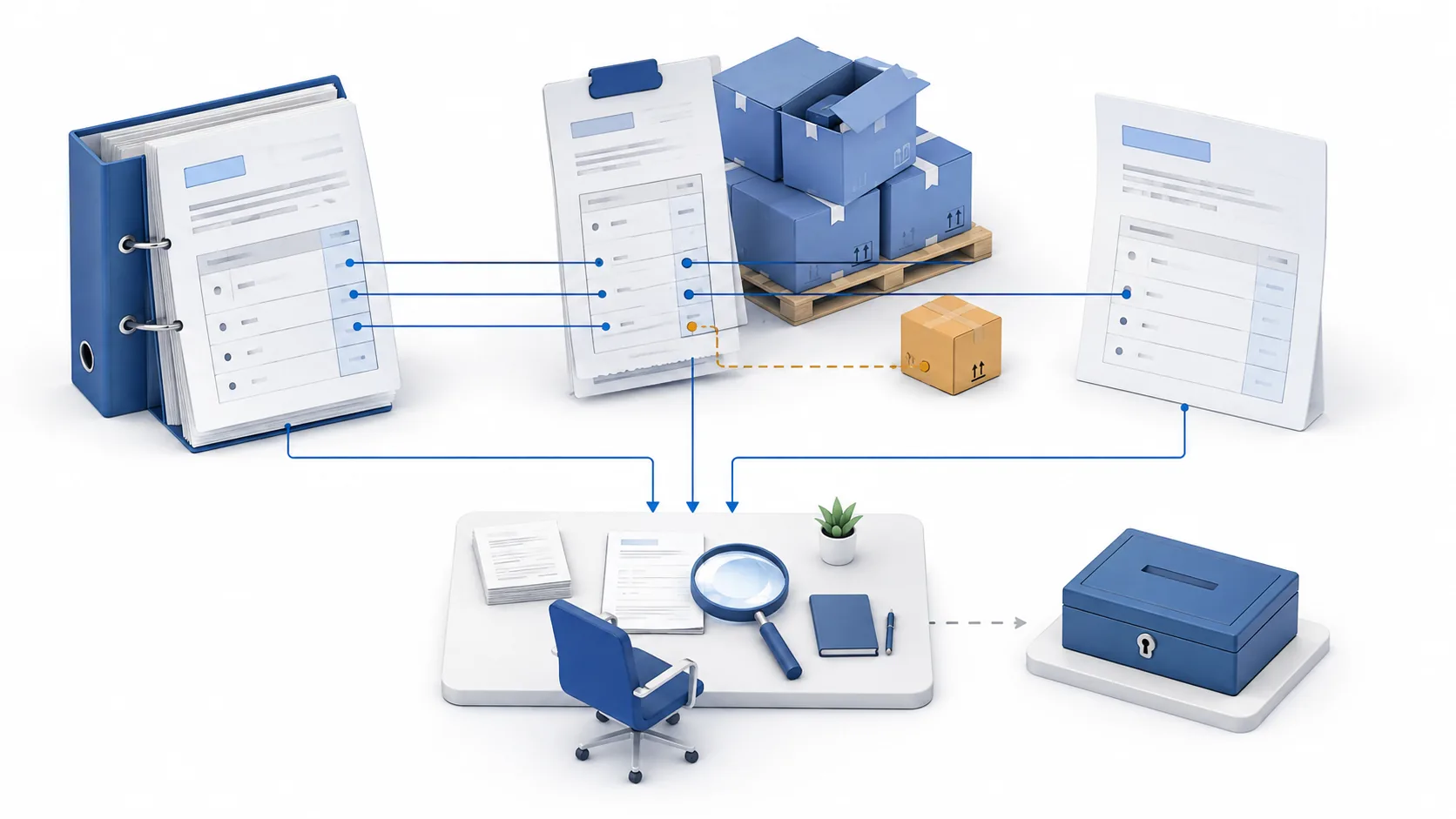
Quick answer: match the right lines before routing an exception
The three documents are the purchase order (PO), the goods receipt or applicable service-receipt record, and the supplier invoice. The order states what was authorized; the receipt records what arrived or what service was recorded; the invoice states what the supplier is billing. Your configured matching policy determines which price, quantity or amount checks apply.
Use the financial system's matching engine where it already meets the requirement. Add automation to gather missing references, calculate approved comparisons, explain discrepancies and notify the responsible person. Keep the outcome specific: “receipt quantity discrepancy resolved” is different from “invoice approved,” “posted” or “paid.” AI can help interpret supporting text, but it should not invent a receipt, alter the tolerance or resolve its own exception.
Microsoft's matching overview distinguishes invoice price checks against the PO from quantity checks against selected product receipts; it also treats charges matching separately. That distinction is more useful than assuming a green total proves every control passed. Microsoft: accounts payable invoice matching.
Build a line-level match record, not a folder of PDFs
A reviewer needs the relationship between records. Start with the entity, supplier and supplier site, invoice ID and line, PO line and schedule, selected receipt lines, and source versions. A PDF attachment without a line reference leaves the next person to repeat the investigation. Preserve the original extracted value alongside a corrected value; do not quietly replace ambiguous optical character recognition (OCR) output.
For quantity-based purchases, record the ordered quantity, receipts, returns or corrections, earlier billed allocations and current invoice quantity in a consistent unit. For amount-based services, document the configured amount or milestone basis and the relevant service evidence instead of inventing a physical quantity. A receipt is not necessarily proof of a separate quality-inspection requirement being satisfied.
| Record group | Minimum evidence to retain | Question the reviewer must answer |
|---|---|---|
| Identity and scope | Entity, supplier/site, invoice line, PO line/schedule and selected receipts | Are these records about the same authorized purchase? |
| Quantity or amount basis | Original units, approved conversion, receipts, returns and prior allocations | What remains available for this invoice under the actual configuration? |
| Commercial terms | Price, currency, discounts, charges and relevant order revision | Are we comparing the same price basis and effective terms? |
| Rules and result | Matching policy, tolerance version, calculation and individual discrepancies | Which exact check passed, failed or could not run? |
| Resolution and control | Owner, evidence request, decision, system status and recheck timestamp | Who can correct the condition, and what is still restricted? |
Download the editable three-way matching review worksheet. Use one record per reviewed line or explicitly identified group of allocations. If one invoice maps to several orders or receipts, keep those relationships visible rather than compressing them into a single unexplained total.
Be precise about configuration. In Oracle's documented tolerance behavior, an active percentage tolerance with no value allows unlimited variance, while zero permits no variance. That is an Oracle-specific setting, not a universal rule for all tools. Inspect and test the actual setting rather than assuming blank means strict. Oracle: invoice tolerances.
Nine three-way matching exceptions and their resolution evidence
1. The PO reference is missing, wrong or out of scope
An invoice may contain a valid-looking number that belongs to another entity, a different supplier or an unrelated purchase. Similar descriptions and equal totals do not establish the relationship. First determine whether the transaction actually requires a PO and whether the referenced order is eligible under the approved process.
Automation can propose candidate records with the identifiers and reasons for the suggestion. A buyer or authorized AP reviewer should confirm the link. If a non-PO process is appropriate, use that separately approved route; do not create a backdated order or force-match the nearest description. Retain the original reference, corrected reference and reason for the change.
2. Goods arrived, but the receipt is absent or unposted
“Delivered” in a carrier message, “received” in a warehouse conversation and a posted product receipt are not interchangeable records. Ask the receiving owner whether the goods arrived, whether the correct receipt exists and whether the receiving transaction has reached the authoritative system. This separates a physical delivery problem from a posting delay.
The useful automated message names the PO schedule, invoiced quantity and missing receipt reference. It should not ask someone to “approve the invoice” when only receiving evidence is missing. Microsoft provides a concrete example where unposted receipts produce quantity warnings despite otherwise acceptable prices. Microsoft: three-way matching policies.
Once the responsible person records the actual receipt, refresh the source and rerun the affected checks. Do not turn an email assertion into a receipt transaction automatically.
3. Partial deliveries or earlier invoices consume the available balance
A PO for 100 units does not make 100 units available for every incoming invoice. Several receipt lines may exist, and an earlier invoice may already be allocated against them. Conversely, comparing a partial invoice with the full order can produce a false mismatch when the relevant received portion is sufficient.
AP and receiving should inspect which receipt lines the current invoice is meant to consume and how the system treats prior billed quantities. Keep the allocation detail, not just a lifetime delivered total. The example below shows why 80 received units can leave only 50 for the next invoice after 30 have already been billed.
Resolve the relationship or ask for a supplier correction as appropriate. Do not subtract credits or canceled invoices mechanically: first verify that the relevant transaction has actually reversed the allocation in your system. An explanatory spreadsheet must reconcile to that system, not replace it.
4. Units of measure do not agree
An order expressed in cartons and an invoice expressed in individual items can appear different while describing the same delivery. They can also conceal a real shortage if the pack size changed. “One box” is not a safe conversion rule without the item-specific definition that applied to the purchase.
Use an approved conversion record, preserve both original units and show the arithmetic. For example, twelve cartons of ten items represent 120 items only if the confirmed conversion is ten per carton. If the invoice actually covers a different pack configuration, route the question to purchasing or the item-data owner rather than inferring the conversion from the amount.
Retest both quantity and per-unit price after normalization. Fixing the quantity unit while leaving the price unit unchanged creates a second error that can look like a supplier overcharge.
5. Unit price, discounts or order revisions differ
A price discrepancy may reflect an invoicing error, a legitimate approved revision, an incorrectly applied discount or a mismatch between gross and net values. The system should show which order version and price basis it used. An attractive invoice total can hide one overpriced line offset by an unrelated cheaper line.
Ask the buyer to verify the effective authorized terms. AP can correct an extraction error against the invoice; a buyer may need to correct an approved order; the supplier may need to issue a corrected document. Those are different actions with different owners. Do not raise a tolerance merely to make an exception disappear.
Record the old and new values, evidence and decision authority. Recalculate affected unit-price and total checks independently. Resolving the commercial explanation does not itself change the posted source or clear another quantity discrepancy.
6. Freight, tax, currency or rounding changes the comparison basis
Matching merchandise alone does not explain the full invoice. A freight charge may be a separate line, a discount may apply to selected items, and transaction-currency amounts may differ from accounting-currency amounts. Tax treatment also requires the applicable configuration and qualified review; it should not be guessed from a document's appearance.
Split the investigation into the actual components. Show the merchandise basis, separate charges, discounts, tax fields, currency and approved conversion or rounding rule. Route unexplained commercial charges to purchasing and tax questions to the appropriate specialist. Do not absorb an unexplained tax or freight difference into a broad “rounding” allowance.
A currency conversion explanation should identify the relevant rate source and date under company policy. It is not permission to change the rate until the numbers happen to match.
7. A return or receipt correction makes the earlier match stale
A successful match was a result at a point in time. A later return, corrected received quantity or canceled receipt can change the evidence supporting that result. If your automation only listens for new invoices, it may never revisit the affected invoice after the receipt changes.
Oracle documents a report specifically for receipts modified after invoice matching, including quantity corrections and returns. This is a concrete example of why the relationship must be rechecked after source changes. It is not proof that every integration monitors these changes automatically. Oracle: matched and modified receipts.
Link the changed receipt to affected invoices and notify the authorized owner. If an invoice is already posted or paid, the recovery route may involve a credit or other controlled accounting process; do not silently edit a historic match result and present it as current approval.
8. Duplicate ingestion or ambiguous allocation reuses the same evidence
The same invoice can arrive by email and portal, and two workers can process it almost simultaneously. Separate invoices can also compete for the same remaining receipt balance. A duplicate file and an over-allocation are different problems, so keep invoice identity checks separate from receipt-allocation checks.
Use stable document and line identifiers, retain the supplier reference, and check existing status before retries. A proposed match should read the latest balance again before any authorized write. Where the system supports transactional controls or idempotent operations, test those controls in the actual integration rather than assuming a prompt can prevent a race.
If the write times out, first inspect whether it succeeded. Repeating the action without checking can create a second allocation. Route uncertain outcomes to reconciliation with the original request ID and system response.
9. Services, milestones or inspections need a different evidence basis
Services may be billed by hours, accepted deliverables or an amount-based milestone. A shipment-style quantity is not always the right model. The business owner must identify the contract requirement and the system's configured receipt or service-entry process. A timesheet alone may not satisfy the required acceptance condition.
Where a separate inspection or acceptance control is required, retain that additional evidence instead of calling basic three-way matching complete. Keep the meaning of “received,” “inspected” and “accepted” explicit. Do not manufacture a goods receipt simply because the workflow expects a third document.
Start these cases outside an automated goods-matching pilot unless the service or inspection basis has been deliberately configured and tested. A transparent separate route is more useful than a misleading universal match percentage.
Implement the workflow in six controlled stages
- Select a narrow purchase population. Choose an entity, a stable item category and a known receipt process. Record excluded services, special payment arrangements and unsupported cases. Establish who owns rules, receiving corrections, invoice corrections and release authority before running the pilot.
- Capture a consistent source snapshot. Retrieve permitted invoice, PO, receipt and prior-allocation records. Include retrieval times, document versions and unresolved changes. Stop with a named missing-field result when a required identifier or conversion is uncertain; do not feed a guessed value into an otherwise precise calculation.
- Run explicit checks. Normalize using approved mappings, compare the correct lines and execute versioned tolerances in deterministic logic or the native engine. Store individual results. A check that could not run must not be counted as a pass, and an acceptable price must not overwrite an unresolved quantity result.
- Send an evidence-specific request. Tell the buyer, receiving owner or AP reviewer what differs and what evidence would resolve it. Include links rather than unnecessary copies. Keep multiple conditions on one case when appropriate, but identify each owner and the still-active restrictions.
- Refresh and revalidate after correction. Read current source records and allocation balances again. Confirm that the system accepted the correction; retain both the previous result and the new result with timestamps. Reconcile uncertain retries before issuing another write or clearing the case.
- Monitor both resolved and missed exceptions. Review a sample of apparently clean matches as well as flagged lines. Track unresolved age by responsible function, reopened cases and incorrect-pass findings. A queue that shrinks because exceptions were suppressed is not a successful implementation.
Define measurements before the pilot. For example, the exception rate can be flagged eligible invoice lines divided by all eligible lines checked in the same period. Report excluded and uncheckable lines separately. A manually sampled false-pass count describes that sample; it is not a production-wide accuracy estimate without a suitable sampling design.
Worked example: an invoice below the PO total can still exceed receipts
Reconstruct the available quantity
The following is a synthetic teaching example, not company data. Assume one item, one entity and supplier, USD 20 per unit, no tax or freight, no permitted quantity variance, and a simplified allocation rule. The order is 100 units. Two receipts record 60 and 20 units. An earlier invoice has already used 30 received units. The current invoice requests 60 units at the correct price.
| Check | Calculation | Result |
|---|---|---|
| Original order value | 100 × USD 20 | USD 2,000 |
| Net receipts before any return | 60 + 20 | 80 units |
| Balance available for the current invoice | 80 − 30 previously billed | 50 units |
| Current invoice | 60 × USD 20 | USD 1,200 |
| Quantity not supported by that balance | 60 − 50 | 10 units, USD 200 at the stated price |
| If a later five-unit return is recorded before resolution | 80 − 5 − 30 | 45 available; gap becomes 15 units or USD 300 |
The invoice value is below the order value, and its unit price agrees. Neither fact resolves the ten-unit receipt gap. After the return, the gap grows to fifteen. These are explanatory arithmetic results under the stated assumptions—not an instruction to pay a partial amount, create an accrual or change a supplier liability.
Try the downloadable scenarios and challenge the conclusion
Download the synthetic matching scenarios. The dataset varies the current quantity, prior allocation and return while keeping price and ordered quantity explicit. It contains no real supplier or employee information. Column names are stable English identifiers so the same file can be used with all three article languages.
For each row, calculate net receipts = received − returned, available quantity = net receipts − previously invoiced, and quantity gap = max(current invoice quantity − available quantity, 0). Multiply the gap by the stated unit price only to explain its value. The included expected values allow a reader to check the arithmetic; they do not reproduce a complete enterprise resource planning (ERP) matching engine.
Test the interpretation as well as the formula. A row with zero quantity gap means only that this particular check found no excess quantity. It does not verify document identity, inspection, tax, duplicate status or approval. A row with no receipt should remain a missing-evidence case even if a formula can output a number. Record that distinction in the worksheet rather than relabeling missing evidence as a confirmed supplier error.
Choose the simplest method that preserves these controls
Manual review with a structured worksheet is a reasonable starting point for low volume or poorly understood exceptions. It makes the evidence and decisions visible, but does not by itself protect against concurrent allocations or keep balances current. Reconcile it to the system of record and limit access to sensitive documents.
Native ERP matching is usually the first option to inspect when the organization already captures orders and receipts there. Evaluate its actual line, tolerance, allocation, hold and correction behavior. Do not buy another layer solely because the current team has not documented an existing feature or configured its notification route.
A controlled integration or script can collect records or deliver exception requests between systems. Its main obligations are reliable identifiers, version handling, safe retries, access controls and reconciliation. Arithmetic is straightforward only after the business meaning of the inputs is fixed.
Agent-assisted coordination may be useful when the bottleneck is reading explanations, identifying missing evidence or preparing clear handoffs across teams. It adds interpretation risk and another access boundary. Use the same acceptance tests as for the simpler methods; fluent summaries do not exempt it from traceability or change control.
Where OpenMax could fit—and what must be demonstrated
OpenMax describes its product as a human–agent collaboration platform. That positioning suggests a possible coordination role around a matching process, but does not establish a verified AP connector, a receipt-allocation engine or permission to post or pay invoices. OpenMax's product positioning.
A sensible evaluation would start with a sanitized, read-only exception packet. Ask the proposed workflow to identify the relevant lines, explain the supplied deterministic result, draft one precise evidence request and preserve unresolved questions. The finance system should remain authoritative for balances and restrictions. Any record access, messaging integration, audit trail or write permission must be separately demonstrated and approved in the intended deployment.
Do not add OpenMax if the existing native workflow resolves the problem adequately. Consider it when multi-team coordination is the documented gap, and only if an evaluation shows that the handoff can be traced and corrected. Bring the worksheet, one partial-receipt case and one source-change case when you discuss a three-way matching coordination evaluation with OpenMax.
For broader ownership and release conditions, see invoice exception handling. For employee-submitted costs rather than PO invoices, use expense policy review. The accounts payable automation overview provides wider workflow context; this page stays focused on line matching and its exceptions.
Safeguards before using the result in an accounting workflow
Agree on the separate permissions for purchasing, receiving, AP correction, tolerance maintenance, approval and payment. Proposed automation should operate with the minimum access needed for its task. Attachment text is evidence to inspect, not instructions to change rules, reveal credentials or send financial documents to an unapproved destination.
Preserve the individual restriction states. Oracle documents that holds can block payment and sometimes accounting, with different release mechanisms. Your actual system configuration and authorized role determine what a correction permits. Do not infer that clearing one matching condition releases every hold. Oracle: how invoice holds work.
Use controlled retention and access for invoice and supplier data. Keep bank-detail changes, tax decisions, fraud concerns and already-paid recovery cases in their specialist processes rather than expanding a matching assistant's authority. A supplier discrepancy is not proof of dishonesty. Have the controller and relevant procurement, tax, treasury and security owners review the workflow before any live action.
Return to the opening invoice by reconstructing its current receipt balance, not by accepting its lower total. Use the worksheet to identify the unresolved line and its owner, then request the missing evidence and revalidate before the separately authorized next step.
Frequently asked questions
Is three-way matching the same as invoice approval?
No. Matching compares specified invoice, order and receipt information under configured rules. Approval, posting and payment are separate states. A match result only supports the next step that your authorized workflow permits; it does not independently authorize payment.
Can a partial invoice pass when the full order has not arrived?
It may, if the selected receipt evidence and remaining allocations support that invoice under the configured policy. Check the relevant lines and prior billing rather than demanding that every partial invoice equal the full order. Unsupported quantity must remain unresolved or follow an approved exception process.
What tolerance should we use?
There is no universal percentage. The controller and system owner should define the unit, amount or percentage basis, currency treatment, applicable population and authorization. Test blank, zero and nonzero settings in the actual system; do not copy a documentation example as company policy.
Can AI make a missing goods receipt?
No. A missing receipt requires the responsible receiving or service owner to provide or record the actual evidence through the approved process. AI may help identify the missing reference or draft the request. It must not manufacture delivery evidence or backdate a transaction to make the match pass.
What should happen when a receipt changes after matching?
Identify affected invoices, refresh the relationship and rerun the relevant checks. Retain the prior result and source-change history. If an invoice is posted or paid, route recovery to the authorized accounting process rather than silently treating the old match as current or automatically reversing transactions.
Sources, editorial method and review limits
Prepared by the OpenMax content team; source review date: September 4, 2026. This is OpenMax's own commercial resource. Official Microsoft and Oracle documentation supports the explicitly attributed system behaviors; the proposed workflow and synthetic examples are editorial teaching material, not those vendors' endorsement or a tested OpenMax implementation.
The calculation dataset demonstrates only the arithmetic described above. It contains no production observations, customer outcomes or claimed accuracy improvement. A qualified named finance reviewer has not been supplied for this article. Obtain that review, confirm current system behavior and approve the actual policies before operational use.
Revision note — September 4, 2026: replaced short exception cards with evidence and resolution guidance; added partial-allocation and return calculations plus downloadable synthetic scenarios; replaced unverified OpenMax integration assurances with explicit evaluation requirements. This change record describes editorial work, not professional approval.
Primary references: Microsoft matching overview, Microsoft policy examples, Oracle tolerances, Oracle modified-receipt report, Oracle holds, and OpenMax. The sources explain bounded behaviors; they do not certify the article or replace your accounting policy.