

名片
用户点击消息区或单聊头部里的头像时,弹出名片浮层。
名片
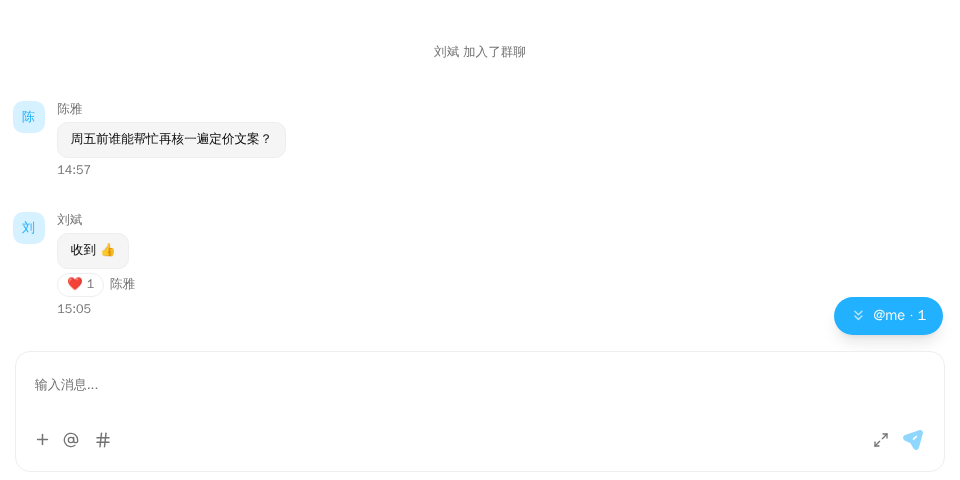
演示截图。演示跑在内存里的示例 host 上(演示工具包里的 useDemoHost,不在发布的包里);你的应用里换成 createChatHost() 创建的 host。
演示源码(用到文档站的演示工具包和 Tailwind CSS 类名,不能直接复制使用): profile-card-basic.tsx
"use client";

import { ChatHostProvider } from "@openmaxai/chat/host";
import { MessageThread } from "@openmaxai/chat/message-thread";
// Docs helpers: useDemoHost() is an in-memory host with sample data (no backend).
// In your app, pass the host from createChatHost() or your own ChatHost instead.
import { useDemoData, useDemoHost } from "./kit";

export default function ProfileCardDemo() {
	// With the `profileCard` capability every avatar opens a profile card. Its buttons call
	// `openDirectMessage` / `openSelfSettings` / `openAgentManagement` on your host
	// (here they print the call at the bottom of the demo).
	const host = useDemoHost();
	const { conversations } = useDemoData();

	return (
		<ChatHostProvider host={host}>
			<div className="flex h-full flex-col bg-background text-foreground">
				<MessageThread conversation={conversations[0]} />
			</div>
		</ChatHostProvider>
	);
}
演示使用内存宿主(useDemoHost),下面的示例改用你自己的宿主。
何时使用
- 让用户在聊天里查看某人是谁:点击消息上的头像,或单聊
ChatHeader里对方的头像和名字。 - 人员名片显示成员和他名下的 Agent;Agent 名片显示在线状态、主人和「复制 Agent ID」。点主人或 Agent 可在同一浮层内切换。
- 不需要挂载组件:宿主提供
profileCard能力后,MessageThread和ChatHeader里的头像就能点开。用createChatHost时由 SDK 组出,见下文。
代码示例
用 createChatHost
用 createChatHost 建宿主时不用自己写 profileCard:适配器给出取数的 profiles,你在 profileCardActions 里给出「设置」和「管理」去哪,SDK 组出名片。「发送消息」默认由 SDK 找到或新建与对方的私聊,交给页面用 useChatSdkOpenConversation 挂的监听者。
host.ts
import { createChatHost } from "@openmaxai/chat-sdk/react";

export const host = createChatHost({
  adapter: createAcmeAdapter(), // 适配器上有 profiles: { loadProfile, listOwnedAgents }
  profileCardActions: {
    openSelfSettings: () => router.push("/settings"),
    openAgentManagement: (memberId) => router.push(`/agents?id=${memberId}`),
  },
});
名片打开的第一帧用成员数据里已有的名字和头像,其余等 loadProfile 回来。profiles 的形状见 ChatSdkAdapterProfiles,三个动作见 ChatSdkProfileCardActions。用 @openmaxai/chat-openmax 时适配器已经带 profiles,只要交 profileCardActions。
提供能力
profile-card.ts
import type { ChatProfileCardPort } from "@openmaxai/chat/host";

export const profileCard: ChatProfileCardPort = {
  async loadProfile(memberId) {
    const m = await api.getMember(memberId);
    if (!m) return undefined;
    return {
      memberId: m.id,
      displayName: m.name,
      avatarUrl: m.avatar,
      kind: m.isAgent ? "agent" : "human",
      subtitle: m.roleName ?? "成员",
      onlineStatus: m.status,
      ownerMemberId: m.ownerId,
      agentIdentityId: m.identityId,
    };
  },
  listOwnedAgents: async (memberId) => (await api.getOwnedAgents(memberId)).map(toProfileEntity),
  openDirectMessage: (memberId) => openDmWith(memberId),
  openSelfSettings: () => router.push("/settings"),
  openAgentManagement: (memberId) => router.push(`/agents/${memberId}`),
};
subtitle 是算好的字符串,比如成员的角色或 Agent 的模型。名片本身不查角色。
在 React 状态里处理跳转
openDirectMessage 通常要切换当前选中的会话。可以在 <ChatProvider> 里面嵌套一层 @openmaxai/chat/host 的 ChatHostProvider,在现有宿主上加 profileCard。ChatHostProvider 不是安装入口,只替换它下面这一块界面用到的能力。
profile-cards.tsx
import { ChatHostProvider, useChatHost } from "@openmaxai/chat/host";

export function ProfileCards({ onOpenConversation, children }: ProfileCardsProps) {
  const parent = useChatHost();
  const host = useMemo(
    () => ({
      ...parent,
      profileCard: {
        loadProfile,
        listOwnedAgents,
        openDirectMessage: (memberId: string) => openDmWith(memberId).then(onOpenConversation),
        openSelfSettings: () => router.push("/settings"),
      },
    }),
    [parent, onOpenConversation],
  );
  return <ChatHostProvider host={host}>{children}</ChatHostProvider>;
}
API
名片没有 props,由宿主提供 ChatProfileCardPort:
| 成员 | 类型 | 必填 | 说明 |
|---|---|---|---|
loadProfile |
(memberId: string) => Promise<ChatMemberProfile | undefined> |
是 | 名片内容;找不到时返回 undefined |
listOwnedAgents |
(memberId: string) => Promise<readonly ChatProfileEntity[]> |
是 | 人员名片上的 Agent 列表;没有时返回 [] |
openDirectMessage |
(memberId: string) => void |
是 | 他人名片上的「发消息」 |
openSelfSettings |
() => void |
是 | 自己名片上的「设置」 |
openAgentManagement |
(memberId: string) => void |
否 | 你名下 Agent 名片上的「管理」 |
peekProfile |
(memberId: string) => ChatMemberProfile | undefined |
否 | 同步给出第一帧(已有的名字、头像),loadProfile 回来前先画;不给时先显示「加载中」 |
ChatProfileEntity 是 { memberId, displayName, avatarUrl?, kind?, subtitle? };ChatMemberProfile 另有 onlineStatus?、ownerMemberId?、agentIdentityId?。
依赖的能力
| 能力 | 缺了会怎样 |
|---|---|
profileCard |
消息区和单聊头部的头像都不可点 |
profileCard(openAgentManagement) |
没有「管理」 |
loadProfile 返回 undefined 时名片显示「加载失败」;ChatMemberProfile 没有 agentIdentityId 时没有「复制 Agent ID」。
名片与浮层上的每个词都逐个取宿主 i18n 能力:标签、「加载失败」按钮与「复制 Agent ID」的提示(profileCard.*、common.agentTag,ns 为 components)、在线状态(status.*,ns 为 agent)与「加载中」(loading,ns 为 common)。你的 i18n 认不得这些键(回原键、带命名空间前缀的原键或空串)时用英文。名片不读页面全局的 react-i18next 实例,页面不必为它包 I18nextProvider。名字与副标题是 loadProfile 给的,原样显示;用 createChatHost 时,SDK 补的缺省副标题、没有名字时的「未命名」,以及适配器给了 orgRole 时内置组织角色的名字(memberRow.member、memberDisplay.unnamed、rolePermissionMenu.roles.*.label,ns 为 components)按同一规则取词。
无障碍
- 头像是原生
<button>,有可见焦点环。浮层是 Radix Popover,触发按钮带aria-expanded/aria-haspopup,关闭后焦点回到头像。 - 卡内图标为
aria-hidden,操作按钮以文字作标签。
常见问题
头像点不了。
宿主没有 profileCard 能力。用 createChatHost 时,适配器要有 profiles、参数里要有 profileCardActions,缺一样头像就不可点;自己写宿主时需要自己加。createChatHost 提供哪些见已知限制 · 默认宿主。
名片能显示成员的角色吗?
能。在 loadProfile 里算好,作为 subtitle 返回。