

国际化
设置聊天界面语言、接入 i18next,并在运行时切换语言。
国际化
聊天自带中英文文案。用 locale 选语言,再在外层包一个你自己装的 react-i18next 的 I18nextProvider,实例用 createChatI18n 建。
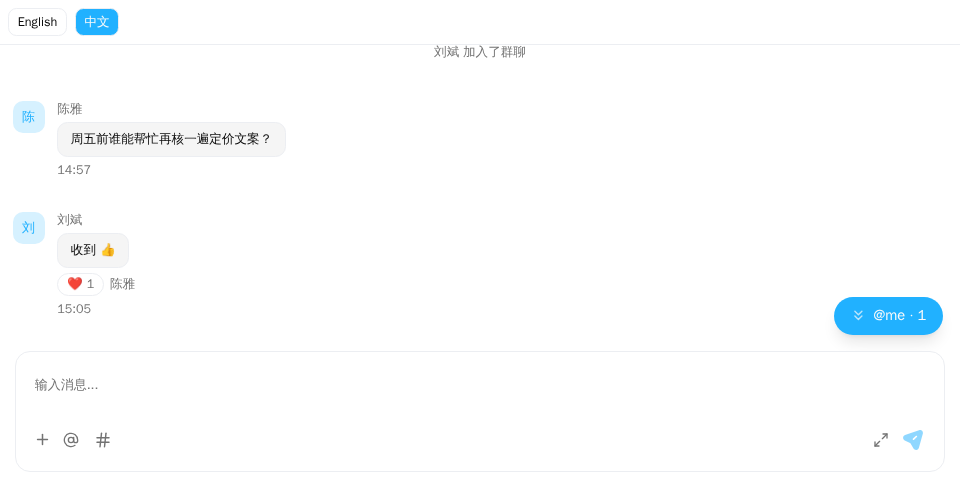
演示截图。演示跑在内存里的示例 host 上(演示工具包里的 useDemoHost,不在发布的包里);你的应用里换成 createChatHost() 创建的 host。
演示源码(用到文档站的演示工具包和 Tailwind CSS 类名,不能直接复制使用): i18n-language-switch.tsx
"use client";

import { ChatHostProvider } from "@openmaxai/chat/host";
import { MessageThread } from "@openmaxai/chat/message-thread";
import { useState } from "react";
// Docs helpers: useDemoHost() is an in-memory host with sample data (no backend).
// In your app, pass the host from createChatHost() or your own ChatHost instead.
import { useDemoData, useDemoHost } from "./kit";

export default function LanguageSwitchDemo() {
	const host = useDemoHost();
	// `i18n` is the i18next instance from `createI18n()` that you pass to <I18nextProvider>.
	// The demo host's `i18n` capability reads from the same instance.
	const { conversations, i18n } = useDemoData();
	const [language, setLanguage] = useState(i18n.language);

	const change = async (next: string) => {
		await i18n.changeLanguage(next);
		setLanguage(next);
	};

	return (
		<ChatHostProvider host={host}>
			<div className="flex h-full flex-col bg-background text-foreground">
				<div className="flex gap-2 border-b p-2 text-xs">
					{["en", "zh"].map((lng) => (
						<button
							key={lng}
							type="button"
							onClick={() => change(lng)}
							className={`rounded-md border px-2 py-1 ${
								language === lng ? "bg-primary text-primary-foreground" : ""
							}`}
						>
							{lng === "en" ? "English" : "中文"}
						</button>
					))}
				</div>
				{/* Strings read through `host.i18n.t` are picked up on the next render: re-mount. */}
				<MessageThread key={language} conversation={conversations[0]} />
			</div>
		</ChatHostProvider>
	);
}
演示里的 useDemoHost() 是带示例数据的内存宿主;实际项目中换成 createChatHost 创建的宿主。
语言设置
使用 createChatHost 时传 locale:
import { createChatHost } from "@openmaxai/chat-openmax/react";

const host = createChatHost({
  baseUrl: "https://openmax.com",
  wsUrl: "wss://openmax.com/ws",
  auth: { mode: "token", getToken },
  orgId: currentOrgId,
  locale: "zh-CN",
});
上面是接 OpenMax 的一行写法,连接那几项见接入 OpenMax。接自己的后台时用 @openmaxai/chat-sdk/react 的 createChatHost({ adapter, locale }),locale 写法相同。
自定义宿主则传给 createLocalPorts:
...createLocalPorts({ scope: "my-chat", currentUserId: () => ME, locale: "zh-CN" }),
locale 是 BCP-47 标签:主标签为 en 时用英文,其余都用中文,默认 "zh-CN"。日期也按它格式化。
i18next Provider
文案有两个来源,都要接上:
| 来源 | 组件 | 你要提供 |
|---|---|---|
宿主的 i18n 能力 |
消息区、输入框、头部、会话列表、卡片、群管理;ChatProvider 之内的浮窗 / 停靠栏 / 抽屉外壳 |
无需额外操作,createChatHost / createLocalPorts 已提供 |
react-i18next 的 useTranslation() |
@ 提及面板、可拖宽的会话列表栏;浮窗 / 停靠栏 / 抽屉外壳在 i18n 认不得某个词时退回它,挂在 ChatProvider 之外时只用它 |
外层的 I18nextProvider,实例用 createChatI18n 建 |
src/app.tsx
import { createChatI18n } from "@openmaxai/chat-sdk";
import { I18nextProvider } from "react-i18next";

const i18n = createChatI18n({ locale: "zh-CN" });

export function App() {
  return (
    <I18nextProvider i18n={i18n}>
      <ChatProvider host={host}>{/* 聊天 */}</ChatProvider>
    </I18nextProvider>
  );
}
不包 provider,第二行的组件会直接显示翻译 key。createChatI18n 的 locale 要和宿主的 locale 一致。
createChatI18n 每次调用都新建一份独立的 i18next 实例,内置聊天的中英文文案。它不挂 initReactI18next,不改你应用全局的 react-i18next 实例,所以你自己组件里的 useTranslation 照旧读你的实例,除非它们渲染在这个 I18nextProvider 之内。react-i18next、i18next 是 peer 依赖:I18nextProvider、useTranslation 一律从你装的那份 react-i18next 取,和聊天组件读的是同一个模块,SDK 不转出它们。
createLocalPorts 的 i18n 能力也用私有的 i18next 实例,不影响页面其他地方的 useTranslation。
运行时切换
默认的 i18n 能力固定在创建时的 locale。要运行时切换,让它指向交给 I18nextProvider 的那份实例:
src/app.tsx
import { createChatI18n } from "@openmaxai/chat-sdk";
import { createChatHost } from "@openmaxai/chat-openmax/react";
import { useTranslation } from "react-i18next";

const i18n = createChatI18n({ locale: "zh-CN" });

const host = createChatHost({
  baseUrl: "https://openmax.com",
  wsUrl: "wss://openmax.com/ws",
  auth: { mode: "token", getToken },
  orgId: currentOrgId,
  ports: {
    i18n: {
      t: (key, vars) => i18n.t(key, { ns: "chat", ...vars }),
      locale: () => (i18n.language === "zh" ? "zh-CN" : "en-US"),
    },
  },
});

function ChatArea() {
  const { i18n } = useTranslation();
  // 用 i18n.changeLanguage("en") 切换;语言一变就重新挂载聊天。
  return <Chat key={i18n.language} />;
}
- 例子用的是接 OpenMax 的一行写法,连接那几项见接入 OpenMax。接自己的后台时改用
@openmaxai/chat-sdk/react的createChatHost({ adapter, ports }),ports写法相同。 - 有些组件会在
vars.ns里指定别的命名空间,所以vars要展开在ns: "chat"后面。 - 依赖
i18n能力的组件不会因语言变化自动重渲染,所以给聊天子树加key。重新挂载不会丢失已缓存的会话和消息。
createChatI18n 建的实例两种语言都内置,changeLanguage 不用等加载。它不检测、也不记住语言:用户的选择(cookie、设备语言等)由你读出来作为 locale 传入,调 changeLanguage 时自己保存。
支持的语言
en 和 zh,createChatI18n 和默认的 i18n 能力都内置了这两种。聊天文案在 chat 命名空间,@ 提及面板在 components。