

Conversation list
Show the user's conversations with unread counts, drafts, search, pinning and hiding.
Conversation list
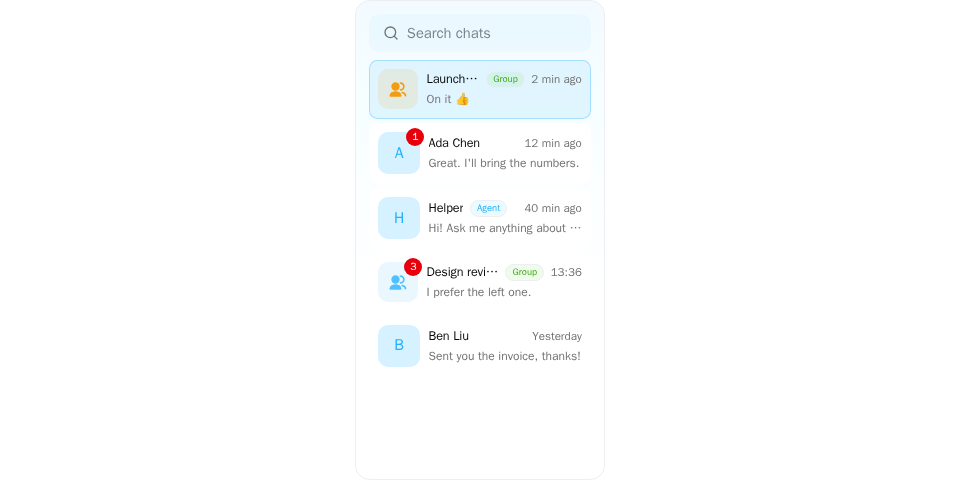
Screenshot of this demo. It runs on an in-memory sample host (useDemoHost from the demo kit, which is not part of the packages); in your app, pass the host from createChatHost() instead.
Demo source (uses the docs demo kit and Tailwind CSS classes, so it cannot be copied as is): conversation-list-basic.tsx
"use client";

import { ConversationList } from "@openmaxai/chat/conversation-list";
import { ChatHostProvider } from "@openmaxai/chat/host";
import { useState } from "react";
// Docs helpers: useDemoHost() is an in-memory host with sample data (no backend).
// In your app, pass the host from createChatHost() or your own ChatHost instead.
import { useDemoData, useDemoHost } from "./kit";

export default function ConversationListDemo() {
	const host = useDemoHost();
	const { conversations } = useDemoData();
	const [selectedId, setSelectedId] = useState<string | null>("launch");

	return (
		<ChatHostProvider host={host}>
			<div className="flex h-full justify-center bg-background text-foreground">
				<ConversationList
					conversations={conversations}
					selectedId={selectedId}
					onSelect={(conversation) => setSelectedId(conversation.id)}
					onDeselect={() => setSelectedId(null)}
				/>
			</div>
		</ChatHostProvider>
	);
}
The demo code's useDemoHost() is an in-memory host; see Overview for wiring a real one.
This page covers ConversationList, a low-level component of @openmaxai/chat. They have no style root: the SDK stylesheet applies only inside the .omx-chat component root each SDK component brings along, and ChatRoot is not a style scope itself, so the examples below render unstyled as written. To use them, put them inside ChatRoot and wrap them in an element with the class omx-chat (plus omx-dark in dark mode, with colorScheme="dark" on ChatRoot), or style them yourself. A wrapper alone is not enough: outside ChatRoot, dialogs, menus and popovers portal to document.body, outside your wrapper, and get no styles; within ChatRoot they land in its overlay container, which carries the class omx-chat. With a host from createChatHost, use the SDK component CwsConversationList instead; see Quick start.
When to use
- The left column of a chat screen: pinned grid, conversation rows (avatar, name, last message, time, unread badge,
[Draft]), pin / mute / hide actions. - Search covers conversations and the organization directory; picking an agent opens a DM with it.
- The list does not fetch data. You pass the conversations in.
Examples
Basic
sidebar.tsx
import { ConversationList } from "@openmaxai/chat/conversation-list";

export function Sidebar({ conversations, selectedId, onSelect }: SidebarProps) {
  return (
    <ConversationList
      conversations={conversations}
      selectedId={selectedId}
      onSelect={(c) => onSelect(c.id)}
      onSelectConversationId={onSelect}
      onDeselect={() => onSelect(null)}
    />
  );
}
onSelectConversationId fires after a DM is opened from directory search (only the new id is known). onDeselect fires when the selected conversation is hidden.
When pinning, unpinning, hiding or unhiding fails, the list stays as it was and the host's attention.notify("error", …) shows "Failed to pin conversation", "Failed to unpin conversation", "Failed to hide conversation" or "Failed to unhide conversation". onDeselect fires only after hiding succeeds.
When the host's conversations has setMuted, conversation rows (the hover actions with a mouse, swiping left on touch) and the pinned grid (the long-press panel on touch) offer "Mute" or "Unmute"; observed conversations do not. When muting fails, the list stays as it was and shows "Could not mute the conversation" or "Could not unmute the conversation"; on success the list refetches and the muted mark follows.
With the OpenMax SDK
useChatSdkConversationList() loads, pages and refreshes the list on realtime signals (including after a reconnect). Use it under <ChatProvider> with a host from createChatHost().
sidebar.tsx
import { ConversationList } from "@openmaxai/chat/conversation-list";
import { useChatSdkConversationList } from "@openmaxai/chat-sdk/react";

export function Sidebar({ selectedId, onSelect }: SidebarProps) {
  const { conversations, isLoading, isLoadingError, hasNextPage, fetchNextPage, refetch } =
    useChatSdkConversationList();
  return (
    <ConversationList
      conversations={conversations}
      selectedId={selectedId}
      onSelect={(c) => onSelect(c.id)}
      onSelectConversationId={onSelect}
      isLoading={isLoading}
      loadFailed={isLoadingError}
      onRetry={() => void refetch()}
      hasNextPage={hasNextPage}
      onLoadMore={() => void fetchNextPage()}
    />
  );
}
A "new group" button
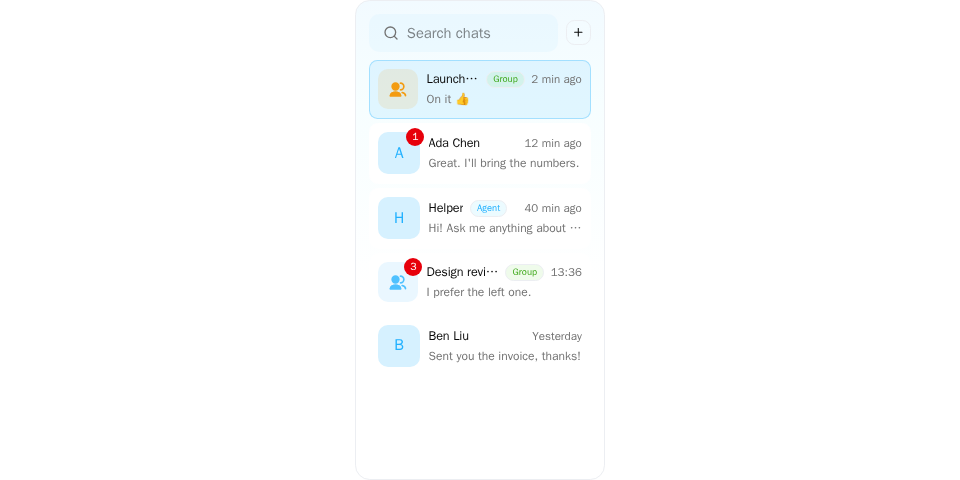
Screenshot of this demo. It runs on an in-memory sample host (useDemoHost from the demo kit, which is not part of the packages); in your app, pass the host from createChatHost() instead.
Demo source (uses the docs demo kit and Tailwind CSS classes, so it cannot be copied as is): conversation-list-create-group.tsx
"use client";

import { ConversationList } from "@openmaxai/chat/conversation-list";
import { CreateGroupModal } from "@openmaxai/chat/group-management";
import { ChatHostProvider } from "@openmaxai/chat/host";
import { Plus } from "lucide-react";
import { useState } from "react";
// Docs helpers: useDemoHost() is an in-memory host with sample data (no backend).
// In your app, pass the host from createChatHost() or your own ChatHost instead.
import { Button, useDemoData, useDemoHost } from "./kit";

export default function ConversationListCreateGroupDemo() {
	const host = useDemoHost(); // includes the `groupManagement` capability
	const { conversations, lang } = useDemoData();
	const [selectedId, setSelectedId] = useState<string | null>("launch");
	const [creating, setCreating] = useState(false);

	return (
		<ChatHostProvider host={host}>
			<div className="flex h-full justify-center bg-background text-foreground">
				<ConversationList
					conversations={conversations}
					selectedId={selectedId}
					onSelect={(conversation) => setSelectedId(conversation.id)}
					onDeselect={() => setSelectedId(null)}
					// Rendered next to the search box.
					createGroupAction={
						<Button
							size="icon-sm"
							variant="outline"
							aria-label={lang === "zh" ? "新建群聊" : "New group"}
							onClick={() => setCreating(true)}
						>
							<Plus />
						</Button>
					}
				/>
			</div>
			<CreateGroupModal
				open={creating}
				onClose={() => setCreating(false)}
				onCreated={(conversationId) => setSelectedId(conversationId)}
			/>
		</ChatHostProvider>
	);
}
Pass a trigger as createGroupAction (the slot right of the search box) and render CreateGroupModal yourself:
const [creating, setCreating] = useState(false);

<ConversationList
  /* … */
  createGroupAction={
    <button type="button" onClick={() => setCreating(true)}>New group</button>
  }
/>
<CreateGroupModal open={creating} onClose={() => setCreating(false)} onCreated={onSelect} />
Resizable column
Store the width yourself; null means the default width (double-click the handle to reset). Dragging ranges from 220 to 560 px and never exceeds 40% of the viewport.
The list takes its width from the CSS variable --chat-list-w. When width is null, that is the value you set on an ancestor, or clamp(220px, 26vw, 340px) if you set none (see Theming · Layout). Otherwise the column sets the variable on its own wrapper, which overrides an ancestor's value.
import {
  ConversationList,
  ResizableConversationListColumn,
} from "@openmaxai/chat/conversation-list";

const [width, setWidth] = useState<number | null>(null);

<ResizableConversationListColumn width={width} onWidthChange={setWidth}>
  <ConversationList /* … */ />
</ResizableConversationListColumn>;
API
ConversationList
| Prop | Type | Default | Description |
|---|---|---|---|
conversations |
ChatConversation[] |
required | The rows to show |
selectedId |
string | null |
required | Id of the highlighted row |
onSelect |
(conv: ChatConversation) => void |
required | A row was clicked |
onSelectConversationId |
(conversationId: string) => void |
— | A DM was opened from directory search |
onDeselect |
() => void |
— | The selected conversation was hidden |
hasNextPage |
boolean |
— | More conversations can be loaded |
isFetchingNextPage |
boolean |
— | The next page is loading |
onLoadMore |
() => void |
— | Called on scroll to the bottom |
isLoading |
boolean |
false |
First page loading: skeleton instead of "no conversations" |
loadFailed |
boolean |
false |
The first page failed and nothing is loaded: "Failed to load" instead of "no conversations". A failed refetch or next page while rows are loaded does not count |
onRetry |
() => void |
— | The retry button in the loadFailed state; no button when omitted |
memberNames |
Record<string, string> |
— | member_id → display name, names conversations the viewer observes but isn't in |
createGroupAction |
ReactNode |
— | Slot right of the search box; empty when omitted |
onDetach |
(conv, drop: ListRowDrop) => void |
— | A row or pinned avatar was dragged out with the mouse or a pen and released outside the list (float at the release point) or over the dock zone (dock). Given and not on a narrow screen ⇒ rows drag; opening the window is up to you |
hiddenInSurfaces |
boolean |
false |
Experimental. Some conversations were left out of conversations because they are open in a floating window or the docked column. Only changes the empty-state text: with no rows and no search the list says they are in a floating window or the side panel instead of "no conversations". It hides nothing itself: leave those conversations out of conversations yourself. Ignored while searching and in the strip |
compact |
boolean |
false |
Experimental. Draw the list as a 64 px strip of avatars (avatar, unread count and mention badge; the name in a tooltip and in the accessible name with the unread count). Up / Down move between avatars, Enter selects. Pinned first, then a divider; no search box, createGroupAction or pinned grid. Entering the strip clears the search text; focus inside the list moves to the selected avatar (and back to the search box on leaving). Ignored on narrow screens |
The current user comes from the host's identity capability, not props. The layout follows the width of the list's container; see Responsive behavior.
ResizableConversationListColumn
| Prop | Type | Default | Description |
|---|---|---|---|
width |
number | null |
required | Width in px; null for the default |
onWidthChange |
(w: number | null) => void |
required | New width after a drag or key press; null after a reset |
children |
ReactNode |
required | The ConversationList |
inactive |
boolean |
false |
Pass true on narrow screens (one pane at a time): the wrapper becomes display: contents, sets no width and shows no handle. The ConversationList inside stays mounted when this flips, so search text and scroll position are kept |
Capabilities
| Capability | Without it |
|---|---|
conversations (list, setPinned, setHidden) |
Throws a named error while rendering. Don't render the list if your app has none |
attention |
Required; notices when pinning, muting or hiding fails |
identity |
Required; current user and directory search |
drafts |
Required; [Draft] prefix |
messaging |
Required; opens a DM from directory search |
Accessibility
- The search input is
role="searchbox"with a label;Escapeclears it, and the clear button is labelled. - Pin, unpin, mute and unmute buttons are labelled.
- The resize handle is a
role="separator"witharia-orientation="vertical"andaria-valuenow, in the tab order;ArrowLeft/ArrowRightresize. - The loading skeleton is
aria-busy. - Rows have no keyboard interaction; selecting a conversation needs a pointer or touch.
FAQ
A conversation I observe shows no name.
Pass memberNames.