

Quick start
Build a working chat on an in-memory host, then switch it to a real backend.
Quick start
Prerelease
The packages are
3.0.0prereleases. Pin one exact version for every@openmaxai/chat*package; see Installation.
A Vite app with a conversation list and a message thread on in-memory data; no server needed.
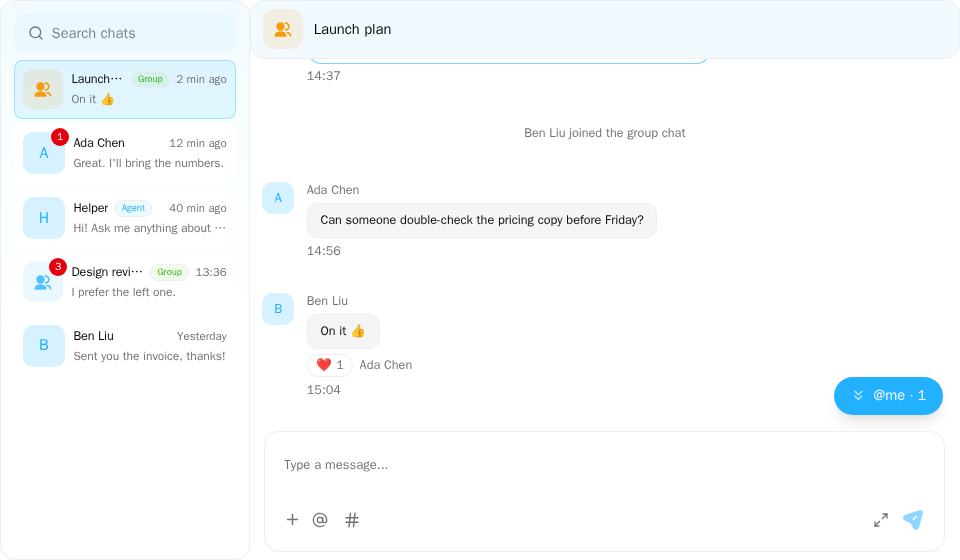
Screenshot of this demo. It runs on an in-memory sample host (useDemoHost from the demo kit, which is not part of the packages); in your app, pass the host from createChatHost() instead.
Demo source (uses the docs demo kit and Tailwind CSS classes, so it cannot be copied as is): chat-app.tsx
"use client";

import { ConversationList } from "@openmaxai/chat/conversation-list";
import { ChatHeader } from "@openmaxai/chat/header";
import { ChatHostProvider } from "@openmaxai/chat/host";
import { MessageThread } from "@openmaxai/chat/message-thread";
import { useState } from "react";
// Docs helpers: useDemoHost() is an in-memory host with sample data (no backend), and
// useDemoConversations() is its conversation list (a DM started from search is added to it).
// In your app, pass the host from createChatHost() or your own ChatHost instead.
import { useDemoConversations, useDemoHost, useIsCompact } from "./kit";

export default function ChatApp() {
	const host = useDemoHost();
	const conversations = useDemoConversations();
	const isCompact = useIsCompact();
	const [selectedId, setSelectedId] = useState<string | null>(
		isCompact ? null : conversations[0].id,
	);
	const selected = conversations.find((c) => c.id === selectedId) ?? null;

	return (
		<ChatHostProvider host={host}>
			<div className="flex h-full bg-background text-foreground">
				{/* On a phone show one column at a time: the list, or the open conversation. */}
				<aside
					className={
						isCompact ? (selected ? "hidden" : "min-w-0 flex-1") : "shrink-0"
					}
				>
					<ConversationList
						conversations={conversations}
						selectedId={selectedId}
						onSelect={(c) => setSelectedId(c.id)}
						onDeselect={() => setSelectedId(null)}
						// Starting a DM from search opens it here too.
						onSelectConversationId={setSelectedId}
					/>
				</aside>
				{selected && (
					<main className="flex min-w-0 flex-1 flex-col">
						<ChatHeader
							conversation={selected}
							headerTitle={selected.name ?? ""}
							headerSubtitle={null}
							isAgentCollab={false}
							isObserving={false}
							collabAgents={[]}
							typingText={null}
							mode={isCompact ? "compact" : "full"}
							onBack={isCompact ? () => setSelectedId(null) : undefined}
							infoPanelOpen={false}
						/>
						<MessageThread key={selected.id} conversation={selected} />
					</main>
				)}
			</div>
		</ChatHostProvider>
	);
}
Create the app
pnpm create vite my-chat --template react-ts
cd my-chat
pnpm add @openmaxai/chat@3.0.0-beta.5 @openmaxai/chat-store@3.0.0-beta.5 @openmaxai/chat-sdk@3.0.0-beta.5 react-i18next i18next
Pin every @openmaxai/chat* package to the same exact version (3.0.0-beta.5 here; @openmaxai/chat-openmax too when you connect OpenMax later); see Installation. react / react-dom 19, react-i18next (^17.0.8) and i18next (^26.3.2) are peer dependencies. This example does not need @tanstack/react-query.
Configure styles and Vite
See Installation for details.
src/globals.css
@import "@openmaxai/chat-sdk/styles.css";

html,
body,
#root {
  height: 100%;
}
vite.config.ts
import react from "@vitejs/plugin-react";
import { defineConfig } from "vite";

export default defineConfig({
  plugins: [react()],
  resolve: { dedupe: ["react", "react-dom"] },
});
Create an in-memory host
The host is the object the components read from. createChatHost builds one from an adapter; here the adapter is createMemoryAdapter, which keeps a small backend in the browser, so nothing needs a server.
src/chat-host.ts
import { createChatHost } from "@openmaxai/chat-sdk/react";
import { createMemoryAdapter } from "@openmaxai/chat-sdk/testing";

export const adapter = createMemoryAdapter({
  me: { memberId: "me", displayName: "You", kind: "human" },
  people: [
    { memberId: "ada", displayName: "Ada", kind: "human" },
    { memberId: "helper", displayName: "Helper", kind: "agent" },
  ],
  conversations: [
    {
      id: "welcome",
      name: "Welcome",
      messages: [
        { senderId: "helper", text: "Hi! This chat runs entirely in your browser." },
        { senderId: "ada", text: "Send a message to try the composer." },
      ],
    },
    {
      id: "ada",
      type: "DM",
      name: "Ada",
      memberIds: ["ada"],
      messages: [{ senderId: "ada", text: "Hey, how is the SDK going?" }],
    },
  ],
});

export const host = createChatHost({ adapter, locale: "en-US" });
Render the chat
src/app.tsx
import { createChatI18n } from "@openmaxai/chat-sdk";
import {
  ChatProvider,
  ChatRoot,
  ChatSplitLayout,
  ConversationHeader,
  CwsConversationList,
  CwsMessageThread,
  useChatSdkConversationList,
} from "@openmaxai/chat-sdk/react";
import { useState } from "react";
import { I18nextProvider } from "react-i18next";
import { host } from "./chat-host";

const i18n = createChatI18n({ locale: "en-US" });

export function App() {
  return (
    <I18nextProvider i18n={i18n}>
      <ChatProvider host={host}>
        <ChatRoot style={{ display: "flex", height: "100%" }}>
          <Chat />
        </ChatRoot>
      </ChatProvider>
    </I18nextProvider>
  );
}

function Chat() {
  const { conversations } = useChatSdkConversationList();
  const [selectedId, setSelectedId] = useState<string | null>(null);
  const selected = conversations.find((c) => c.id === selectedId) ?? null;

  return (
    <ChatSplitLayout
      open={selected !== null}
      list={
        <CwsConversationList
          selectedId={selectedId}
          onSelect={(c) => setSelectedId(c.id)}
          onDeselect={() => setSelectedId(null)}
        />
      }
    >
      {selected && (
        <>
          <ConversationHeader
            conversation={selected}
            onBack={() => setSelectedId(null)}
          />
          <CwsMessageThread key={selected.id} conversation={selected} />
        </>
      )}
    </ChatSplitLayout>
  );
}
src/main.tsx
import { StrictMode } from "react";
import { createRoot } from "react-dom/client";
import { App } from "./app";
import "./globals.css";

createRoot(document.getElementById("root")!).render(
  <StrictMode>
    <App />
  </StrictMode>,
);
ChatProviderinstalls the host and the composer plugins.ChatRootis the context root of the chat: it gives the SDK components inside it their color scheme and the landing node for menus and dialogs. Put every SDK component inside it. It is not a style scope itself: each SDK component brings its own component root, and the stylesheet applies only inside those roots.CwsConversationListandCwsMessageThreadare the SDK's conversation list and message thread (with the composer). They read the host throughChatProvider;useChatSdkConversationListgives you the same list to find the open conversation.ChatSplitLayoutputs the list and the open conversation side by side. On narrow screens (viewport under 768 px) it shows one at a time: the list, or the conversation whileopenis true. It takes its width from its parent, which is whyChatRootgetsdisplay: flex. SeeChatSplitLayout.ConversationHeaderis the bar above the conversation. On narrow screens it shows a back arrow that callsonBack; clearing the selection there brings the list back.
This in-memory host has no workItems, so ChatProvider does not install the # plugin that needs it; the composer offers @ only.
Run it
pnpm dev
Open the URL Vite prints, open Welcome and send a message. To see a message arrive from someone else, call adapter.memory.receive({ conversationId: "welcome", senderId: "ada", text: "Hi" }), for example from a button or a timer.
Connect to a real backend
The createChatHost of @openmaxai/chat-sdk/react used above only takes an adapter ({ adapter }). To connect to OpenMax, install @openmaxai/chat-openmax at the same version as the other packages:
pnpm add @openmaxai/chat-openmax@3.0.0-beta.5
Then replace src/chat-host.ts with a host from createChatHost in @openmaxai/chat-openmax/react; src/app.tsx stays the same:
src/chat-host.ts
import { createChatHost } from "@openmaxai/chat-openmax/react";

export const host = createChatHost({
  baseUrl: "https://openmax.com",
  wsUrl: "wss://openmax.com/ws",
  auth: { mode: "token", getToken: async () => fetchShortLivedToken() },
  locale: "en-US",
});
baseUrl and wsUrl are the OpenMax addresses (see Connect to OpenMax · OpenMax addresses). See Connect to OpenMax, including how to deploy the realtime connection, or Connect your own backend for anything else.
Embed in Shadow DOM
To put the chat into Shadow DOM, so that your page's CSS cannot reach it, replace ChatRoot in src/app.tsx with ChatShadowRoot and pass it the styles from the string entry @openmaxai/chat-sdk/styles; Chat stays the same:
src/app.tsx
import { createChatI18n } from "@openmaxai/chat-sdk";
import { ChatProvider, ChatShadowRoot } from "@openmaxai/chat-sdk/react";
import * as chatStyles from "@openmaxai/chat-sdk/styles";
import { I18nextProvider } from "react-i18next";
import { host } from "./chat-host";

// `Chat` and its imports as in `src/app.tsx` above

const i18n = createChatI18n({ locale: "en-US" });

export function App() {
  return (
    <I18nextProvider i18n={i18n}>
      <ChatProvider host={host}>
        <ChatShadowRoot styles={chatStyles} style={{ height: "100%" }}>
          <Chat />
        </ChatShadowRoot>
      </ChatProvider>
    </I18nextProvider>
  );
}
The @import of @openmaxai/chat-sdk/styles.css in src/globals.css is then no longer needed. What changes compared with ChatRoot is in Installation · Embed in Shadow DOM.
Troubleshooting
| Symptom | Fix |
|---|---|
| No styles | Check that src/globals.css imports @openmaxai/chat-sdk/styles.css, that src/main.tsx imports ./globals.css, and that the components are the SDK's (CwsConversationList, CwsMessageThread from @openmaxai/chat-sdk/react) inside ChatRoot. The components of @openmaxai/chat (such as MessageThread from @openmaxai/chat/message-thread) have no component root, so the stylesheet does not reach them (Installation) |
Invalid hook call |
Two copies of React. Add dedupe to the Vite config |
A floating window never opens, or the console shows Package version mismatch |
The @openmaxai/chat* packages are installed at different versions. Install the same version of each (Installation) |
| Raw translation keys | I18nextProvider is missing, or it was not given the instance from createChatI18n |
Realtime never connects: the browser shows the WebSocket closing with 1006 |
Your page's origin is not registered. The server answers the handshake with 403 WS_ORIGIN_NOT_ALLOWED, which the browser cannot read, so it only reports 1006. Register the origin by emailing contact@openmax.com, or rewrite Origin in your same-origin proxy; see Connect to OpenMax · Realtime connection |
More in the FAQ.