

Internationalization
Set the chat UI language, connect i18next, and switch languages at runtime.
Internationalization
The chat ships English and Chinese strings. Pick one with locale and wrap the tree in an I18nextProvider from your own react-i18next, given an instance from createChatI18n.
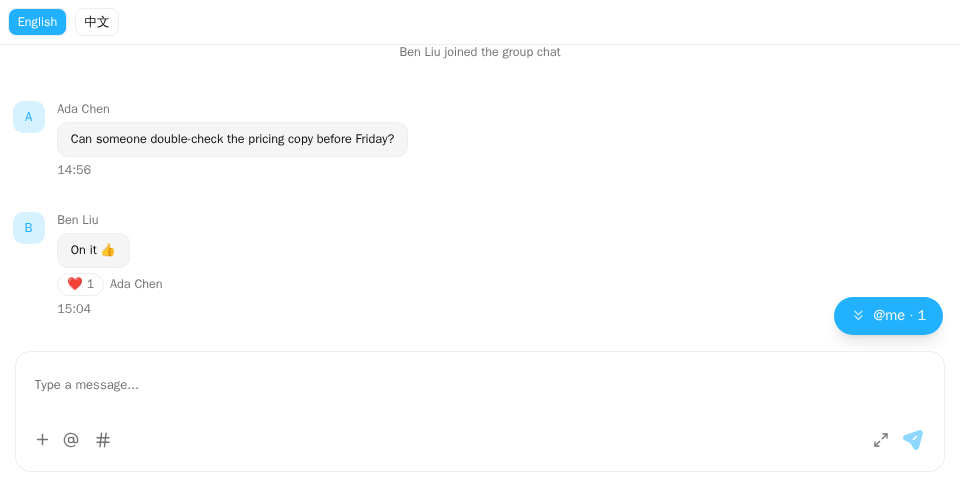
Screenshot of this demo. It runs on an in-memory sample host (useDemoHost from the demo kit, which is not part of the packages); in your app, pass the host from createChatHost() instead.
Demo source (uses the docs demo kit and Tailwind CSS classes, so it cannot be copied as is): i18n-language-switch.tsx
"use client";

import { ChatHostProvider } from "@openmaxai/chat/host";
import { MessageThread } from "@openmaxai/chat/message-thread";
import { useState } from "react";
// Docs helpers: useDemoHost() is an in-memory host with sample data (no backend).
// In your app, pass the host from createChatHost() or your own ChatHost instead.
import { useDemoData, useDemoHost } from "./kit";

export default function LanguageSwitchDemo() {
	const host = useDemoHost();
	// `i18n` is the i18next instance from `createI18n()` that you pass to <I18nextProvider>.
	// The demo host's `i18n` capability reads from the same instance.
	const { conversations, i18n } = useDemoData();
	const [language, setLanguage] = useState(i18n.language);

	const change = async (next: string) => {
		await i18n.changeLanguage(next);
		setLanguage(next);
	};

	return (
		<ChatHostProvider host={host}>
			<div className="flex h-full flex-col bg-background text-foreground">
				<div className="flex gap-2 border-b p-2 text-xs">
					{["en", "zh"].map((lng) => (
						<button
							key={lng}
							type="button"
							onClick={() => change(lng)}
							className={`rounded-md border px-2 py-1 ${
								language === lng ? "bg-primary text-primary-foreground" : ""
							}`}
						>
							{lng === "en" ? "English" : "中文"}
						</button>
					))}
				</div>
				{/* Strings read through `host.i18n.t` are picked up on the next render: re-mount. */}
				<MessageThread key={language} conversation={conversations[0]} />
			</div>
		</ChatHostProvider>
	);
}
The demo's useDemoHost() is an in-memory host with sample data; in your app, use a host from createChatHost.
Language setting
With createChatHost:
import { createChatHost } from "@openmaxai/chat-openmax/react";

const host = createChatHost({
  baseUrl: "https://openmax.com",
  wsUrl: "wss://openmax.com/ws",
  auth: { mode: "token", getToken },
  orgId: currentOrgId,
  locale: "en-US",
});
This is the one-line OpenMax form; for the connection options see Connect to OpenMax. With your own backend, use createChatHost({ adapter, locale }) from @openmaxai/chat-sdk/react; locale is passed the same way.
With a custom host, pass it to createLocalPorts:
...createLocalPorts({ scope: "my-chat", currentUserId: () => ME, locale: "en-US" }),
locale is a BCP-47 tag. A primary tag of en selects English; anything else selects Chinese. The default is "zh-CN". Dates are formatted with it too.
i18next provider
Strings come from two sources; wire up both:
| Source | Components | You provide |
|---|---|---|
The host's i18n capability |
Thread, composer, header, conversation list, cards, group management; the floating / docked / drawer surfaces inside ChatProvider |
Nothing; createChatHost / createLocalPorts provide it |
useTranslation() from react-i18next |
@mention panel, resizable conversation list column; the floating / docked / drawer surfaces fall back to it for keys i18n does not know, and use only it when mounted outside ChatProvider |
An I18nextProvider above the chat, given an instance from createChatI18n |
src/app.tsx
import { createChatI18n } from "@openmaxai/chat-sdk";
import { I18nextProvider } from "react-i18next";

const i18n = createChatI18n({ locale: "en-US" });

export function App() {
  return (
    <I18nextProvider i18n={i18n}>
      <ChatProvider host={host}>{/* chat */}</ChatProvider>
    </I18nextProvider>
  );
}
Without the provider, the second row shows raw translation keys. Pass createChatI18n the same locale as the host.
createChatI18n creates a separate i18next instance on every call, with the chat's English and Chinese strings built in. It does not register initReactI18next and does not change your app's global react-i18next instance, so useTranslation in your own components keeps reading your instance, unless they render inside this I18nextProvider. react-i18next and i18next are peer dependencies: I18nextProvider and useTranslation always come from the react-i18next you installed, the same module the chat components read, and the SDK does not re-export them.
The i18n capability from createLocalPorts uses a private i18next instance too, so your page's own useTranslation calls are unaffected.
Runtime switching
The default i18n capability is fixed to its creation locale. To switch at runtime, point it at the instance you give I18nextProvider:
src/app.tsx
import { createChatI18n } from "@openmaxai/chat-sdk";
import { createChatHost } from "@openmaxai/chat-openmax/react";
import { useTranslation } from "react-i18next";

const i18n = createChatI18n({ locale: "en-US" });

const host = createChatHost({
  baseUrl: "https://openmax.com",
  wsUrl: "wss://openmax.com/ws",
  auth: { mode: "token", getToken },
  orgId: currentOrgId,
  ports: {
    i18n: {
      t: (key, vars) => i18n.t(key, { ns: "chat", ...vars }),
      locale: () => (i18n.language === "zh" ? "zh-CN" : "en-US"),
    },
  },
});

function ChatArea() {
  const { i18n } = useTranslation();
  // Switch with i18n.changeLanguage("zh"); remount the chat when the language changes.
  return <Chat key={i18n.language} />;
}
- The example uses the one-line OpenMax form; for the connection options see Connect to OpenMax. With your own backend, use
createChatHost({ adapter, ports })from@openmaxai/chat-sdk/reactinstead;portsis written the same way. - Some components pass another namespace in
vars.ns, so spreadvarsafterns: "chat". - Components that use the
i18ncapability do not re-render on a language change, hence thekeyon the chat subtree. Cached conversations and messages survive the remount.
The instance from createChatI18n has both languages built in, so changeLanguage needs no loading. It does not detect or remember a language: read the user's choice yourself (cookie, device setting), pass it as locale, and save it when you call changeLanguage.
Supported languages
en and zh, both built into createChatI18n and the default i18n capability. Chat strings are in the chat namespace, the mention panel in components.