

Group management
Let users create groups, edit a group's name and description, and manage its members.
Group management
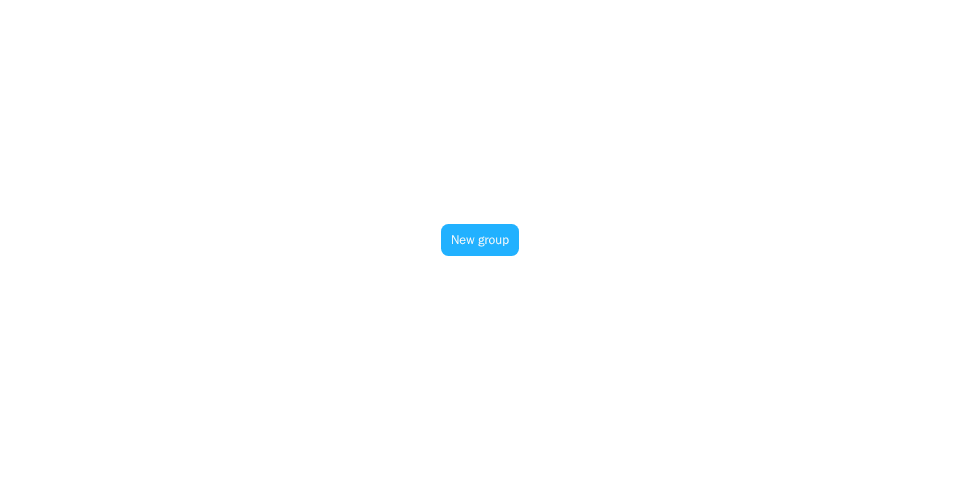
Screenshot of this demo. It runs on an in-memory sample host (useDemoHost from the demo kit, which is not part of the packages); in your app, pass the host from createChatHost() instead.
Demo source (uses the docs demo kit and Tailwind CSS classes, so it cannot be copied as is): group-management-create.tsx
"use client";

import { CreateGroupModal } from "@openmaxai/chat/group-management";
import { ChatHostProvider } from "@openmaxai/chat/host";
import { useState } from "react";
// Docs helpers: useDemoHost() is an in-memory host with sample data (no backend).
// In your app, pass the host from createChatHost() or your own ChatHost instead.
import { Button, useDemoData, useDemoHost, useDemoNotify } from "./kit";

export default function CreateGroupDemo() {
	const host = useDemoHost(); // includes `groupManagement.createGroup`
	const { lang } = useDemoData();
	const notify = useDemoNotify();
	const [open, setOpen] = useState(false);

	return (
		<ChatHostProvider host={host}>
			<div className="flex h-full items-center justify-center bg-background text-foreground">
				<Button onClick={() => setOpen(true)}>
					{lang === "zh" ? "新建群聊" : "New group"}
				</Button>
			</div>
			<CreateGroupModal
				open={open}
				onClose={() => setOpen(false)}
				onCreated={(conversationId) =>
					notify("success", `onCreated("${conversationId}")`)
				}
			/>
		</ChatHostProvider>
	);
}
The demo code's useDemoHost() is an in-memory host; see Overview for wiring a real one.
This page covers CreateGroupModal, ChatInfoPanel and AddMemberContainer, low-level components of @openmaxai/chat. They have no style root: the SDK stylesheet applies only inside the .omx-chat component root each SDK component brings along, and ChatRoot is not a style scope itself, so the examples below render unstyled as written. To use them, put them inside ChatRoot and wrap them in an element with the class omx-chat (plus omx-dark in dark mode, with colorScheme="dark" on ChatRoot), or style them yourself. A wrapper alone is not enough: outside ChatRoot, dialogs, menus and popovers portal to document.body, outside your wrapper, and get no styles; within ChatRoot they land in its overlay container, which carries the class omx-chat. With a host from createChatHost, use the SDK components instead: the create-group entry is in CwsConversationList and the info panel is CwsGroupInfoPanel, as described below.
When to use
CreateGroupModal: the "new group" dialog with name, description and a directory member picker.ChatInfoPanel: the group info side panel (full screen in a narrow container) to edit name and description, manage members, leave or delete the group, plus an "Agent group settings" section (each agent's reply mode in this group) when the host implementsagentGroupPolicy.AddMemberContainer: the panel's "add members" dialog, also usable on its own.
Used directly, nothing mounts them for you: pass a "new group" trigger to ConversationList as createGroupAction, and open the panel from ChatHeader's onToggleInfoPanel.
With the Chat SDK (@openmaxai/chat-sdk/react) the SDK draws the entry points: when the host has groupManagement, CwsConversationList has a "New group" button and ConversationHeader draws the info button in group chats (without groupManagement it is not drawn even if you pass onToggleInfoPanel); the panel is CwsGroupInfoPanel, which fetches its own members and shows buttons by port. Floating windows, the dock column and the compact drawer already include it. SDK integrations that mount ChatInfoPanel themselves should switch to <CwsGroupInfoPanel>. CwsGroupInfoPanel is itself deprecated: with infoSidebar on ChatProvider, the conversation info sidebar (ConversationInfoSidebar) replaces it in the main area and in floating windows and dock tabs.
Examples
Create a group
sidebar.tsx
import { ConversationList } from "@openmaxai/chat/conversation-list";
import { CreateGroupModal } from "@openmaxai/chat/group-management";

const [creating, setCreating] = useState(false);

<ConversationList
  /* … */
  createGroupAction={
    <button type="button" onClick={() => setCreating(true)}>New group</button>
  }
/>
<CreateGroupModal
  open={creating}
  onClose={() => setCreating(false)}
  onCreated={(conversationId) => setSelectedId(conversationId)}
/>
Group info panel
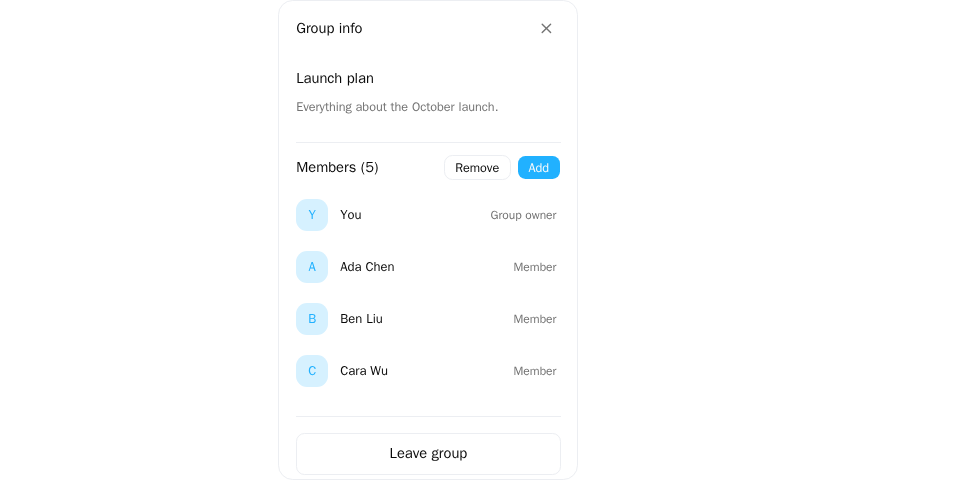
Screenshot of this demo. It runs on an in-memory sample host (useDemoHost from the demo kit, which is not part of the packages); in your app, pass the host from createChatHost() instead.
Demo source (uses the docs demo kit and Tailwind CSS classes, so it cannot be copied as is): group-management-info-panel.tsx
"use client";

import { ChatInfoPanel } from "@openmaxai/chat/group-management";
import { ChatHostProvider } from "@openmaxai/chat/host";
// Docs helpers: useDemoHost() is an in-memory host with sample data (no backend).
// In your app, pass the host from createChatHost() or your own ChatHost instead.
import {
	ME,
	useDemoData,
	useDemoHost,
	useDemoNotify,
	useIsCompact,
} from "./kit";

export default function InfoPanelDemo() {
	const host = useDemoHost(); // includes `groupManagement` with all four writes
	const { conversations, members } = useDemoData();
	const notify = useDemoNotify();
	const isCompact = useIsCompact();
	const group = conversations[0];

	return (
		<ChatHostProvider host={host}>
			<div className="mx-auto flex h-full max-w-sm flex-col bg-background text-foreground">
				<ChatInfoPanel
					conversation={group}
					currentMemberId={ME}
					isMobile={isCompact}
					participants={members.map((m) => ({
						member_id: m.memberId,
						kind: m.kind ?? "human",
						display_name: m.displayName,
						avatar_url: null,
					}))}
					memberStatus={{
						ada: { onlineStatus: "online" },
						helper: { onlineStatus: "online" },
					}}
					onClose={() => notify("info", "onClose()")}
				/>
			</div>
		</ChatHostProvider>
	);
}
conversation-pane.tsx
import { ChatInfoPanel } from "@openmaxai/chat/group-management";

{infoOpen && conversation.type === "GROUP" && (
  <ChatInfoPanel
    conversation={conversation}
    participants={participants}
    currentMemberId={me.id}
    memberStatus={statusByMemberId}
    onClose={() => setInfoOpen(false)}
    onUpdate={(patch) => updateLocalConversation(conversation.id, patch)}
  />
)}
Name and description edits go through the groupManagement capability on the host. Add, remove, leave and delete go through its optional methods too (addMembers, removeMembers, leave, dissolve, see Host capabilities · groupManagement): a button is drawn only for the methods the host has, and the panel shows the outcome: the count when everyone succeeded, who failed and why when someone did not (people with the same reason share one sentence, at most 3 names), and the reason when the whole request failed. An owner who leaves picks a successor, passed to leave as newOwnerId.
ChatInfoPanel also has onAddMembers / onRemoveMembers / onLeave / onDelete callbacks; they are transitional (@deprecated, to be removed in a later version): when given, the panel calls them instead of the port and shows no message of its own. Don't pass them in new code.
Provide the capability
group-management.ts
import type { ChatGroupManagementPort } from "@openmaxai/chat/host";

export const groupManagement: ChatGroupManagementPort = {
  async createGroup({ title, description, memberIds }) {
    const room = await api.createRoom({ name: title, members: memberIds, topic: description });
    return { conversationId: room.id };
  },
  updateGroupProfile: (conversationId, { name, description }) =>
    api.updateRoom(conversationId, { name, topic: description }),
  // Optional: each one present draws its button in the info panel.
  addMembers: (conversationId, memberIds) => api.addToRoom(conversationId, memberIds),
  removeMembers: (conversationId, memberIds) => api.removeFromRoom(conversationId, memberIds),
  leave: (conversationId, options) => api.leaveRoom(conversationId, options?.newOwnerId),
  dissolve: (conversationId) => api.deleteRoom(conversationId),
};
updateGroupProfile gets one field at a time (name and description save separately). If you write the host yourself, refresh your conversation list after a rename so the new name shows there; with createChatHost the SDK refreshes (the conversation list refetches after creating a group or updating its profile, that conversation's member list after adding or removing members), see Adapter interface · groupManagement.
If creating the group fails, the dialog stays open and shows the reason above the submit button. When the createGroup request fails, throw a ChatSdkError: its message is shown if it has one, otherwise the package's text for its kind, otherwise "Failed to create group. Please try again." Any other thrown value is treated as a code error: it is logged with console.error and rethrown, not shown in the dialog.
API
CreateGroupModal
| Prop | Type | Default | Description |
|---|---|---|---|
open |
boolean |
required | Whether the dialog is open |
onClose |
() => void |
required | Called when the dialog closes |
onCreated |
(conversationId: string) => void |
— | Called with the new conversation's id |
ChatInfoPanel
| Prop | Type | Default | Description |
|---|---|---|---|
conversation |
ChatConversation |
required | The group |
onClose |
() => void |
required | Close the panel |
participants |
ChatConversationParticipant[] |
[] |
Members, loaded by you |
currentMemberId |
string |
— | Detects whether you own the group; excludes you from successor candidates |
onUpdate |
(updates: Partial<ChatConversation>) => void |
— | Local patch after a successful name or description edit |
onAddMembers |
(memberIds: string[]) => void |
— | Deprecated (transitional). When given, the port's addMembers is not used |
onRemoveMembers |
(memberIds: string[]) => Promise<void> | void |
— | Deprecated (transitional). When given, the port's removeMembers is not used |
onLeave |
(newOwnerId?: string) => Promise<void> | void |
— | Deprecated (transitional). When given, the port's leave is not used |
onDelete |
() => Promise<void> | void |
— | Deprecated (transitional). When given, the port's dissolve is not used |
ownerId |
string |
conversation.owner_id |
The owner's member id (for example from the member list's role), without rewriting the conversation object |
cover |
boolean |
false |
Cover the nearest positioned ancestor (not the host's whole page); for narrow screens when embedded |
memberStatus |
Record<string, ChatMemberStatus> |
— | memberId → { onlineStatus?, billingSuspended?, creditCapReached? } |
overlay |
boolean |
false |
When not full screen, float over the chat's right edge instead of taking a column |
Each member's conversation role comes from the host's memberStore (the role of each row in the group's member list). When it is there, rename and description, add, remove members and delete follow can() (matching the server); before the member list is loaded, or when it lacks you or a given member, that entry uses the fallback rule: anyone can rename, edit the description and add, and the owner_id member can remove (everyone but themselves) and delete. In a conversation that is not a group (such as an agent collaboration) the name and description are read-only regardless of roles.
The panel picks its form from the width of its container: a full-screen overlay over the conversation below 768 px, a side panel otherwise. See Responsive behavior.
AddMemberContainer
| Prop | Type | Default | Description |
|---|---|---|---|
open |
boolean |
required | Whether the dialog is open |
existingParticipants |
ChatConversationParticipant[] |
required | Current members, excluded from candidates |
onClose |
() => void |
required | Called when the dialog closes |
onAdd |
(memberIds: string[]) => void |
required | Called with the chosen member ids |
Candidates come from directory search, minus current members and inactive accounts.
Capabilities
| Capability | Without it |
|---|---|
groupManagement (createGroup, updateGroupProfile) |
CreateGroupModal and ChatInfoPanel throw a named error while rendering. Without group management, don't render them or pass createGroupAction |
identity |
Required; directory search in the member pickers |
render |
Required; links and mentions in the description |
agentGroupPolicy |
Optional. Without it the panel has no "Agent group settings" section; everything else works. With it, in a group (not an agent collaboration) every agent in the group gets a row: canManageGroupPolicy true shows the "Smart reply / Reply to @ only" switch, false shows the current mode read-only, undefined (cannot tell) hides that row. When the agent's group scope blocks this group, the row says why and offers "Join group allowlist". Without openAgentSettings there is no "Go to agent settings" link. See agentGroupPolicy |
These props fail quietly when omitted:
| Prop | When omitted |
|---|---|
addMembers / removeMembers / leave / dissolve on groupManagement (and no matching callback) |
That button is not drawn |
memberStatus |
Every member shows as offline |
Accessibility
CreateGroupModalis a titled dialog; the name field setsaria-invalidand shows an error once touched or submitted while invalid.- Name and description editors are labelled
role="textbox". The description, when not editing, is a focusablerole="button";EnterorSpacestarts editing. - Leave, delete and remove-member confirmations are standard dialogs.