

Image viewer
Let users click an image in a message to open it in a full-screen viewer.
Image viewer
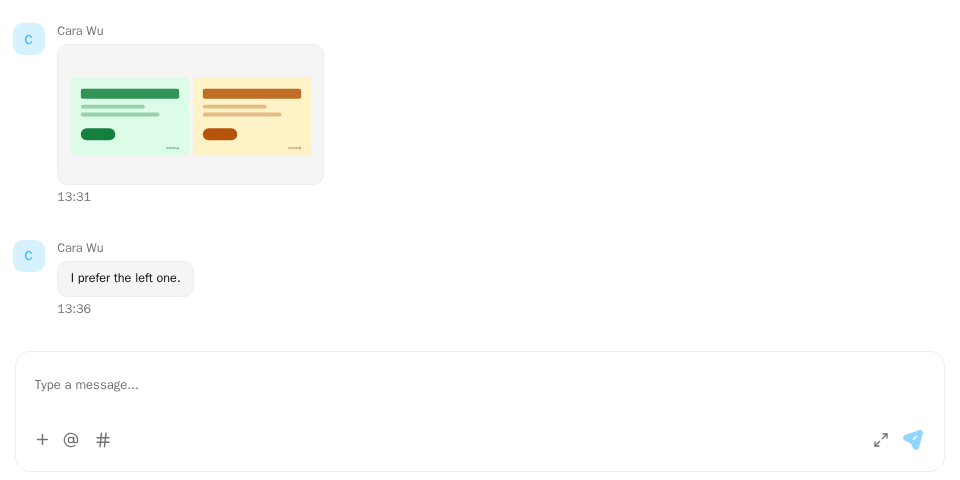
Screenshot of this demo. It runs on an in-memory sample host (useDemoHost from the demo kit, which is not part of the packages); in your app, pass the host from createChatHost() instead.
Demo source (uses the docs demo kit and Tailwind CSS classes, so it cannot be copied as is): image-viewer-basic.tsx
"use client";

import { ChatHostProvider } from "@openmaxai/chat/host";
import { MessageThread } from "@openmaxai/chat/message-thread";
import {
	ChatImageLightbox,
	type ChatImageSlide,
} from "@openmaxai/chat-sdk/react";
import { useMemo, useState } from "react";
// Docs helpers: useDemoHost() is an in-memory host with sample data (no backend).
// In your app, pass the host from createChatHost() or your own ChatHost instead.
import { useDemoData, useDemoHost } from "./kit";

export default function ImageViewerDemo() {
	const [viewer, setViewer] = useState({
		slides: [] as ChatImageSlide[],
		index: 0,
		open: false,
	});
	// The `mediaViewer` capability: the thread calls `open` when an image is clicked.
	// Keep it stable so the host is not rebuilt on every render.
	const mediaViewer = useMemo(
		() => ({
			open: (slides: readonly ChatImageSlide[], index: number) =>
				setViewer({ slides: [...slides], index, open: true }),
		}),
		[],
	);
	const host = useDemoHost({ mediaViewer });
	const { conversations } = useDemoData();
	const design = conversations.find((c) => c.id === "design") ?? null;

	return (
		<ChatHostProvider host={host}>
			<div className="flex h-full flex-col bg-background text-foreground">
				<MessageThread conversation={design} />
			</div>
			<ChatImageLightbox
				slides={viewer.slides}
				open={viewer.open}
				index={viewer.index}
				onClose={() => setViewer((v) => ({ ...v, open: false }))}
			/>
		</ChatHostProvider>
	);
}
The demo uses an in-memory host (useDemoHost); the examples below
use your own host.
When to use
- Users need to enlarge images in messages. Without the
mediaViewercapability, images are not clickable. With touch input a tap opens the viewer too; a long press on the image shows the message's action bar (see Responsive behavior). MessageThreadcollects every image in the loaded part of the conversation and opens your viewer on the clicked one.- With
createChatHostfrom@openmaxai/chat-sdkyou write no viewer code: withoutports.mediaViewerthe SDK brings its own (ChatImageLightbox), drawn byChatProvider. To use your own viewer, passports.mediaViewer; it replaces the whole port and the SDK draws nothing. To have no viewer at all, passports.mediaViewer: null. - With a hand-written host you render the viewer, or use
ChatImageLightboxfrom@openmaxai/chat-sdk/react.
Examples
With ChatImageLightbox
app.tsx
import {
  ChatImageLightbox,
  type ChatImageSlide,
  ChatProvider,
} from "@openmaxai/chat-sdk/react";
import { useMemo, useState } from "react";

export function App() {
  const [viewer, setViewer] = useState({
    slides: [] as ChatImageSlide[],
    index: 0,
    open: false,
  });
  const mediaViewer = useMemo(
    () => ({
      open: (slides: readonly ChatImageSlide[], index: number) =>
        setViewer({ slides: [...slides], index, open: true }),
    }),
    [],
  );
  const host = useMemo(() => ({ ...baseHost, mediaViewer }), [mediaViewer]);

  return (
    <ChatProvider host={host}>
      {/* ConversationList, MessageThread … */}
      <ChatImageLightbox
        slides={viewer.slides}
        open={viewer.open}
        index={viewer.index}
        onClose={() => setViewer((v) => ({ ...v, open: false }))}
      />
    </ChatProvider>
  );
}
ChatImageLightbox reads its button labels from react-i18next (components namespace), so keep it under the I18nextProvider given an instance from createChatI18n; see Internationalization.
With createChatHost (built in)
Pass nothing: without ports.mediaViewer, createChatHost brings its own viewer. Its state lives in
the host and ChatProvider draws it next to the chat. Images in messages and in Agent replies open in
it, and it moves left and right through every image in the loaded part of the conversation.
- Each button label is read from the host's
i18ncapability aschatImageLightbox.*(nsiscomponents); keys youri18ndoes not know (it returns the key or an empty string) fall back to English. The page does not need anI18nextProviderfor it. - The viewer is rendered in place (
position: fixed): atransformorfilteron an ancestor ofChatProvidertraps it in that box. - While the viewer is open, an expired image URL is not refreshed; close it and click the image again (see known gaps).
To replace the built-in viewer, use ports.mediaViewer below. ChatImageLightbox is exported on its own for a hand-written host, or for showing images outside the chat.
Your own viewer (ports.mediaViewer)
When createChatHost gets ports.mediaViewer, it uses it for the whole port and draws no viewer of
its own. The host is usually created at module scope while lightbox state lives in React, so either
build the host in a component with useMemo or have open write to an external store the lightbox reads.
import { createChatHost } from "@openmaxai/chat-sdk/react";

export const host = createChatHost({
  adapter,
  ports: { mediaViewer: { open: (slides, index) => viewerStore.open(slides, index) } },
});
Turning the viewer off (ports.mediaViewer: null)
ports.mediaViewer takes three values: leave it out for the SDK's own viewer, pass a port to use yours,
or pass null to turn the viewer off.
import { createChatHost } from "@openmaxai/chat-sdk/react";

export const host = createChatHost({
  adapter,
  ports: { mediaViewer: null },
});
With the viewer off, the SDK draws no viewer and the host has no mediaViewer: image cells in messages
are not clickable (no pointer cursor, no role="button"), and neither are images in Agent replies under
the default rendering. If you give markdown.openImageViewer or markdown.renderImageViewer, images in
Agent replies still go to them.
ChatMediaViewerPort on a hand-written host
import type { ChatMediaViewerPort } from "@openmaxai/chat/host";

const mediaViewer: ChatMediaViewerPort = {
  open(slides, index) {
    myLightbox.show(slides.map((s) => ({ url: s.src, caption: s.description })), index);
  },
};
API
ChatMediaViewerPort
| Member | Type | Description |
|---|---|---|
open |
(slides: readonly ChatImageViewerSlide[], index: number) => void |
Open the viewer on slides[index] |
Each slide is { src, alt?, description?, messageId, attachmentIndex, resolveDownloadUrl? }. description is the message
caption; attachmentIndex counts all attachments of the message, not just images.
src is a preview address resolved when the viewer opened and may expire while the viewer stays open. When the host's
attachments port has resolveDownloadUrl (in createChatHost, the adapter's uploads.resolveDownloadUrl), slides of
server attachments carry resolveDownloadUrl(): call it when the user presses download and download from the address it
resolves; if it resolves nothing or fails, download nothing rather than falling back to src. ChatImageLightbox does
this already. Images still being sent have a local src and no resolveDownloadUrl. ChatImageViewerSlide (@openmaxai/chat/host) and ChatImageSlide (@openmaxai/chat-sdk/react) have the same fields and are interchangeable, which is why the examples above type open with ChatImageSlide.
ChatImageLightbox
| Prop | Type | Default | Description |
|---|---|---|---|
slides |
ChatImageSlide[] |
required | Images |
open |
boolean |
required | Open state |
index |
number |
required | Image shown on open |
onClose |
() => void |
required | Called when the user closes it |
Capabilities
| Capability | Without it |
|---|---|
mediaViewer |
Images are not clickable (a host from createChatHost has it by default: the SDK's own when ports.mediaViewer is not given; absent with null) |
attachments (resolveUrls) |
Received images show as unavailable, nothing to open |
Uploading images are not clickable. If the clicked image can't be resolved, the viewer doesn't open.
Accessibility
- With a viewer, images are
role="button", labelled "view image", and open withEnterorSpace. ChatImageLightboxis a labelled modalrole="dialog": arrow keys switch images,Escapecloses, all buttons are labelled, and the current thumbnail hasaria-current.
FAQ
Images in my thread aren't clickable.
A hand-written host has no mediaViewer; add one as shown above. A host from createChatHost brings
its own viewer, so check whether ports.mediaViewer is null.