

Introduction
What OpenMax Chat SDK is — a chat UI where people and agents work in the same conversation — who it is for, and where to start.
Introduction
A styled React chat UI: conversation list, message thread and composer, with people and agents in the same conversations. You supply one host object that loads data and sends messages.
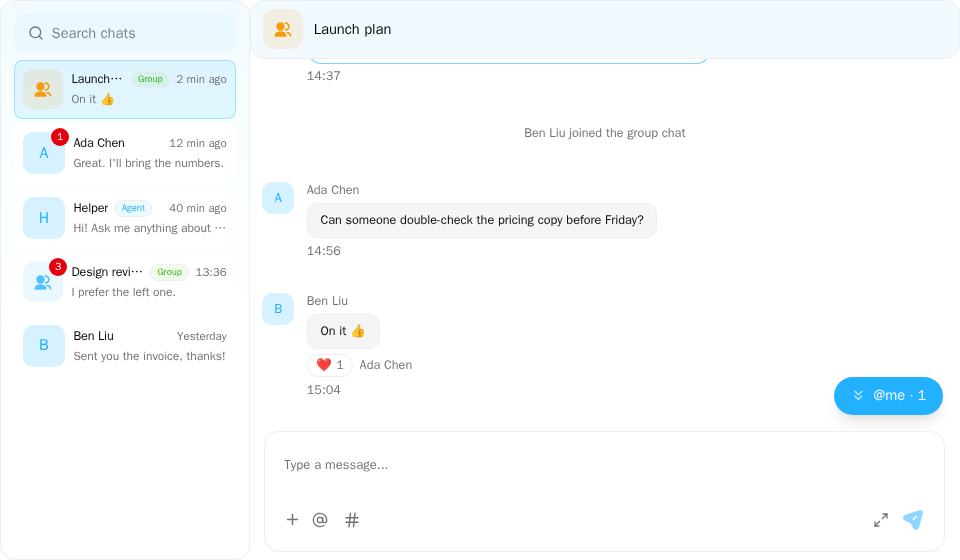
Screenshot of this demo. It runs on an in-memory sample host (useDemoHost from the demo kit, which is not part of the packages); in your app, pass the host from createChatHost() instead.
Demo source (uses the docs demo kit and Tailwind CSS classes, so it cannot be copied as is): chat-app.tsx
"use client";

import { ConversationList } from "@openmaxai/chat/conversation-list";
import { ChatHeader } from "@openmaxai/chat/header";
import { ChatHostProvider } from "@openmaxai/chat/host";
import { MessageThread } from "@openmaxai/chat/message-thread";
import { useState } from "react";
// Docs helpers: useDemoHost() is an in-memory host with sample data (no backend), and
// useDemoConversations() is its conversation list (a DM started from search is added to it).
// In your app, pass the host from createChatHost() or your own ChatHost instead.
import { useDemoConversations, useDemoHost, useIsCompact } from "./kit";

export default function ChatApp() {
	const host = useDemoHost();
	const conversations = useDemoConversations();
	const isCompact = useIsCompact();
	const [selectedId, setSelectedId] = useState<string | null>(
		isCompact ? null : conversations[0].id,
	);
	const selected = conversations.find((c) => c.id === selectedId) ?? null;

	return (
		<ChatHostProvider host={host}>
			<div className="flex h-full bg-background text-foreground">
				{/* On a phone show one column at a time: the list, or the open conversation. */}
				<aside
					className={
						isCompact ? (selected ? "hidden" : "min-w-0 flex-1") : "shrink-0"
					}
				>
					<ConversationList
						conversations={conversations}
						selectedId={selectedId}
						onSelect={(c) => setSelectedId(c.id)}
						onDeselect={() => setSelectedId(null)}
						// Starting a DM from search opens it here too.
						onSelectConversationId={setSelectedId}
					/>
				</aside>
				{selected && (
					<main className="flex min-w-0 flex-1 flex-col">
						<ChatHeader
							conversation={selected}
							headerTitle={selected.name ?? ""}
							headerSubtitle={null}
							isAgentCollab={false}
							isObserving={false}
							collabAgents={[]}
							typingText={null}
							mode={isCompact ? "compact" : "full"}
							onBack={isCompact ? () => setSelectedId(null) : undefined}
							infoPanelOpen={false}
						/>
						<MessageThread key={selected.id} conversation={selected} />
					</main>
				)}
			</div>
		</ChatHostProvider>
	);
}
People and agents in the same conversation
An agent is a conversation member. Like a person, it receives messages, sends messages and can be
@-mentioned. A conversation can hold several people and several agents; agents stay in the
conversation rather than being one-off calls you trigger with a click.
On top of that, the SDK plans to let everyone in the conversation see what an agent is doing: queued
after a message, started, which tools it called, when it finished. People with permission can stop a run, or just one subagent invocation in it;
when an agent needs a decision it posts an approval card and the answer goes back to the agent. This is wired in through the host's agentRuns capability. Planned The concept is in
Core concepts.
Who it is for
- Teams on an OpenMax backend. The SDK ships a host wired to that backend.
- Teams with another data source (a different backend, a mock, a test harness). You write the load and send functions; the SDK fills in drafts, uploads and strings.
Features
- Conversation list: search, unread counts, pinning, hiding.
- Message thread: text, images, files, interactive cards, system notices, replies, agent replies.
- Composer: drafts, attachments,
@mentions,#work-item references. - Live updates over WebSocket, with catch-up after reconnects.
- Group creation and info panel, profile cards, image viewer, agent model selector.
- English and Chinese strings, dark mode, compact layout.
- Capabilities the host leaves out have no UI.
The components support all of the above. Which optional capabilities the OpenMax backend host provides (mentions, profile cards, card actions, group management, among others): see Capabilities and Known limitations · Default host.
How it is built
| Package | What it is |
|---|---|
@openmaxai/chat |
Styled React components (Tailwind CSS v4 + CSS variables) and the ChatHost type |
@openmaxai/chat-sdk |
Ready-made ways to build a ChatHost: one wired to the OpenMax backend, plus local building blocks |
The components never call a backend, a router or browser storage. Everything comes from the ChatHost
you install with a provider. Optional features on it are capabilities; leave one out and its UI is hidden.
The layers are described in Architecture overview.
Experimental
Every export is marked
@experimentaland may change between prereleases. The packages are on npm as3.0.0prereleases; pin an exact version, see Installation.
Next steps
- Installation: Packages, styles, bundler settings and providers.
- Core concepts: Host, capabilities, conversations and members, messages, runs, interactive cards.
- Quick start: A working chat in five minutes, no backend.
- Components: Live demos and props.
- Connect your own backend: Write the load and send functions for your data, then wire in agent events.