

Capabilities
Every capability on the host — which are required, what each optional one switches on, what happens without it, and what the SDK provides for you.
Capabilities
Each capability is a field on the host (the ChatHost object), typed as a …Port interface (ChatMessagingPort, ChatMediaViewerPort, …). Components call it whenever they need to send a message, look up a member or open an image.
src/chat-host.tsx
import type { ChatHost } from "@openmaxai/chat/host";
import { ChatProvider } from "@openmaxai/chat-sdk/react";

const host: ChatHost = {
  identity: { currentUserId: () => "me", getMember, listMembers, searchDirectory },
  messaging: { sendMessage, loadThread, createConversation },
  // ...the other required capabilities, plus any optional ones
};

<ChatProvider host={host}>{/* chat components */}</ChatProvider>;
For OpenMax, createChatHost(config) returns a complete host. Write one by hand only for a mock, a test, or another backend.
Required capabilities
The ChatHost type does not allow leaving these out.
| Field | Purpose |
|---|---|
identity |
Current user id, member lookup, directory search |
messaging |
Send, load thread pages, create a conversation; optional methods enable reactions, recall, edit, read receipts |
inboundDelivery |
Realtime delivery: the endpoint, token and client id the SDK connects with, plus subscribe, the transitional entry point for host-forwarded signals |
drafts |
Per-conversation drafts |
render |
Message text and image rendering |
attention |
Toasts and the unread signal |
i18n |
t() and locale() |
instanceScope |
Query-key namespace, cache invalidation, scoped key–value storage |
attachments |
Upload task board, limits, cancel, attachment URL lookup |
That is nine; every other field is optional. If you render ConversationList or the group management components, type your host as ChatHostWithConversationList or ChatHostWithGroupManagement: they make conversations and groupManagement required, so leaving one out fails to compile instead of throwing at runtime. For both, write ChatHostWithConversationList & ChatHostWithGroupManagement.
Optional capabilities
Leaving one out has one of three effects: usually its feature is absent while the rest keeps working; a few show a disabled placeholder; and without conversations or groupManagement the component that needs it throws. See When an optional capability is missing. Uncheck boxes to try it:
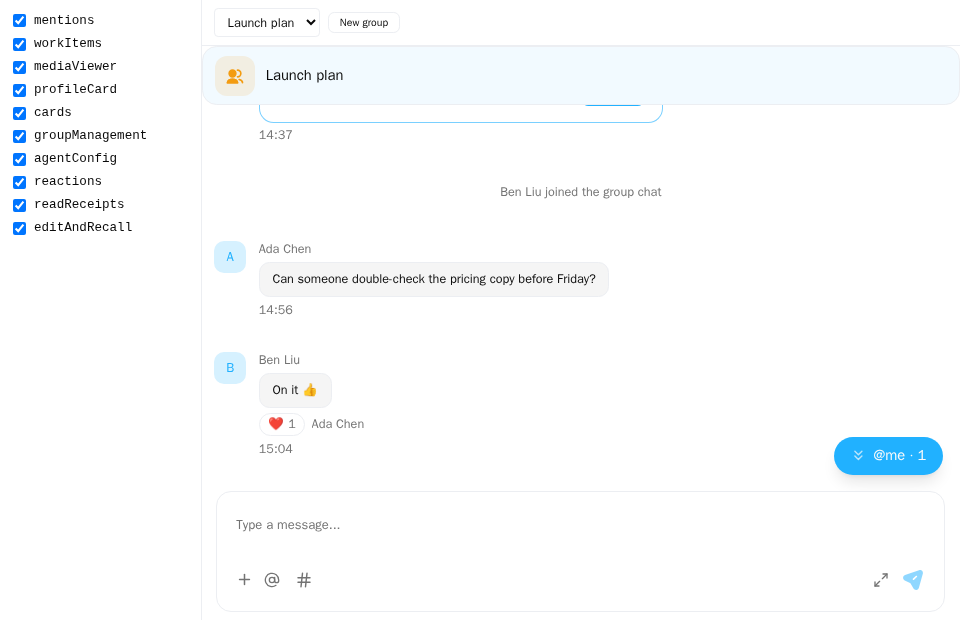
Screenshot of this demo. It runs on an in-memory sample host (useDemoHost from the demo kit, which is not part of the packages); in your app, pass the host from createChatHost() instead.
Demo source (uses the docs demo kit and Tailwind CSS classes, so it cannot be copied as is): capability-toggles.tsx
"use client";

import { CreateGroupModal } from "@openmaxai/chat/group-management";
import { ChatHeader } from "@openmaxai/chat/header";
import { MessageThread } from "@openmaxai/chat/message-thread";
import { ChatProvider } from "@openmaxai/chat-sdk/react";
import { QueryClient, QueryClientProvider } from "@tanstack/react-query";
import { useState } from "react";
// Docs helpers: useDemoHost() is an in-memory host with sample data (no backend).
// In your app, pass the host from createChatHost() or your own ChatHost instead.
import {
	AGENT,
	Button,
	OPTIONAL_CAPABILITIES,
	type OptionalCapability,
	useDemoData,
	useDemoHost,
	useIsCompact,
} from "./kit";

export default function CapabilityToggles() {
	const { conversations, lang } = useDemoData();
	const isCompact = useIsCompact();
	const [off, setOff] = useState<OptionalCapability[]>([]);
	const [conversationId, setConversationId] = useState("launch");
	const [creating, setCreating] = useState(false);
	// The legacy MessageThread reads react-query and the host brings none: wrap a QueryClientProvider
	// yourself.
	const [queryClient] = useState(() => new QueryClient());

	const host = useDemoHost({ without: off });
	const conversation =
		conversations.find((c) => c.id === conversationId) ?? conversations[0];
	const isAgentDm = conversation.id === "helper";

	const toggle = (name: OptionalCapability) =>
		setOff((list) =>
			list.includes(name) ? list.filter((n) => n !== name) : [...list, name],
		);

	return (
		<div
			className={`flex h-full bg-background text-foreground ${isCompact ? "flex-col" : ""}`}
		>
			<fieldset
				className={`shrink-0 overflow-auto p-3 text-sm ${
					isCompact
						? "flex flex-wrap gap-x-3 gap-y-1 border-b"
						: "w-48 space-y-1.5 border-r"
				}`}
			>
				<legend className="sr-only">Capabilities</legend>
				{OPTIONAL_CAPABILITIES.map((name) => (
					<label
						key={name}
						className="flex items-center gap-2 font-mono text-xs"
					>
						<input
							type="checkbox"
							data-capability={name}
							checked={!off.includes(name)}
							onChange={() => toggle(name)}
						/>
						{name}
					</label>
				))}
			</fieldset>

			<QueryClientProvider client={queryClient}>
				{/* Re-mount the chat whenever the host changes. ChatProvider installs only the
				    composer plugins this host can serve: without `workItems` there is no `#`. */}
				<ChatProvider key={off.join(",")} host={host}>
					<main className="flex min-h-0 min-w-0 flex-1 flex-col">
						<div className="flex flex-wrap items-center gap-2 border-b px-3 py-2 text-xs">
							<select
								aria-label="conversation"
								className="rounded border bg-background px-2 py-1"
								value={conversationId}
								onChange={(e) => setConversationId(e.target.value)}
							>
								<option value="launch">{conversations[0].name}</option>
								<option value="helper">
									{lang === "zh" ? "我的 Agent" : "My agent"}
								</option>
							</select>
							{/* A module component throws if its capability is missing: leave it out instead. */}
							{host.groupManagement && (
								<Button
									size="xs"
									variant="outline"
									onClick={() => setCreating(true)}
								>
									{lang === "zh" ? "新建群聊" : "New group"}
								</Button>
							)}
						</div>
						<ChatHeader
							conversation={conversation}
							headerTitle={conversation.name ?? ""}
							headerSubtitle={null}
							isAgentCollab={false}
							isObserving={false}
							collabAgents={[]}
							typingText={null}
							mode={isCompact ? "compact" : "full"}
							infoPanelOpen={false}
							isAgentOwnerDm={isAgentDm}
							agentModelMemberId={isAgentDm ? AGENT : undefined}
						/>
						<MessageThread key={conversation.id} conversation={conversation} />
					</main>
					{host.groupManagement && (
						<CreateGroupModal
							open={creating}
							onClose={() => setCreating(false)}
						/>
					)}
				</ChatProvider>
			</QueryClientProvider>
		</div>
	);
}
| Capability | Switches on | Without it |
|---|---|---|
conversations |
ConversationList: list, pin, hide |
Throws an error naming the capability |
groupManagement |
CreateGroupModal, ChatInfoPanel; the optional addMembers, removeMembers, leave, dissolve are the group info panel's writes for adding, removing, leaving and dissolving |
Both throw an error naming the capability. For each of the four optional writes that is missing, the panel will not draw that button (the panel reading them is not done yet; today it still calls its callback props, see Group management) |
mentions |
"@me" jump capsule in the thread | No capsule |
workItems |
# work-item references in the composer |
No # trigger or toolbar button; see Composer plugins |
profileCard |
Profile popover on avatars and the DM header | Avatars are not clickable |
cards |
Buttons and options on interactive cards (the card plugin needs it) | The card plugin is not installed and cards are drawn read-only: body and result line show, business buttons do not, options and "Create agent" are disabled, truncated cards have no "expand"; no message is sent in place of an answer |
agentConfig |
Agent model selector in the header (needs agentModelMemberId on ChatHeader) |
A disabled placeholder control |
mediaViewer |
Click an image to open the viewer | Images are not clickable |
composerPreferences |
Configurable send shortcut | Enter sends |
navigation |
In-app navigation | The chat components do not read it |
workReferences |
Where work reference chips in message text point and how they open | The chat components do not read it; when the message rendering layer does not get it, the chips are not clickable. See workReferences |
Required capabilities also have optional methods that switch features on:
| Optional method on | Switches on | Without it |
|---|---|---|
messaging: reactions (add and remove both required) |
Reaction picker, toggleable reaction chips | No picker; chips not clickable |
messaging: recall, edit, edit history |
"Recall" and "Edit" in the message menu; "(edited)" opens the history | None of these |
messaging: read receipts |
DM ticks, group read count | No receipts |
messaging: load message by id |
Quotes of messages outside the loaded window; full media captions; the new text of someone else's edit appears live | Quote stays empty; captions not completed; edits by others appear only when the messages load again (recalls and moderation removals stay live) |
messaging: incremental fetch (loadThreadSince) |
New messages from others appear live | They appear after the conversation reloads; reactions still update live |
inboundDelivery: subscribe |
Host-forwarded live updates, while your app still has its own connection (transitional) | The SDK's own connection delivers them; with no connection either (endpointUrl() returns "" or isMock() is true), no live messages, reactions, edits, recalls, receipts or card results |
attachments: URL resolution |
Showing received attachments | Attachments shown as unavailable |
attachments: upload (limit above 0) |
Attachment button in the composer | No attachment button |
render: structured message rendering |
Your own drawing of structured messages | Rendered as ordinary messages |
Field names are in the @openmaxai/chat API reference; the members of each capability and their error rules are in Host capabilities.
Agent runs
Planned
The planned optional capability agentRuns switches on the agent run UI: run progress, tool steps and the stop button in the message thread, the run entry in the header, and the Agent panel.
| Field | Switches on | Without it |
|---|---|---|
agentRuns |
Run progress, run list, stop button | No run progress; the agent's messages show as usual |
agentRuns.loadAgentRuns |
The Agent panel | No Agent panel |
Run events also have to reach the host over the realtime connection; with agentRuns but no realtime events, run progress appears only from the snapshot when a conversation is opened. See Connect your own backend.
When an optional capability is missing
| Behavior | Capabilities |
|---|---|
| Hidden; the rest of the screen is unchanged | mentions, profileCard, mediaViewer, the action footer of cards, optional messaging methods |
| Hidden: the composer plugin that needs it is not installed; the rest of the composer works | workItems |
| Read-only drawing: the message-display plugin that needs it is not installed, and the message area draws those messages read-only, without throwing | cards |
| Disabled placeholder; the layout does not shift | agentConfig, the options and the "Create agent" button on a card |
| Error naming the missing field | conversations (ConversationList), groupManagement (CreateGroupModal, ChatInfoPanel) |
A message-display plugin whose capability is missing is skipped without throwing, also when @openmaxai/chat is used on its own. This differs from composer plugins (used with @openmaxai/chat alone, a composer plugin with a missing capability throws) on purpose: having no cards is a valid state that means read-only cards, not a forgotten capability.
The chat components have no error boundary, so an error unmounts the whole React tree and the page goes blank; see Known limitations. Module components throw rather than show an empty state, so a missing capability is not mistaken for "no conversations". To leave a module out, don't render its component; the group management entry points (createGroupAction on ConversationList, onToggleInfoPanel on ChatHeader) are props you simply don't pass. With the Chat SDK there is nothing to do: when the adapter has no groupManagement, the SDK's list, header and floating surfaces draw no group management entry, and CwsGroupInfoPanel draws nothing.
These props fail quietly when omitted:
| Prop | Component | When you don't pass it |
|---|---|---|
onVisibleSeqChange |
MessageThread |
Read position never advances; the conversation stays unread after a reload |
createGroupAction |
ConversationList |
No "new group" button |
onToggleInfoPanel |
ChatHeader |
No group info button |
onLeave / onDelete / onRemoveMembers / onAddMembers |
ChatInfoPanel |
Confirm dialogs open, then nothing happens |
memberStatus |
ChatInfoPanel |
Every member shows as offline |
Composer plugins
Each composer plugin declares the capabilities it needs in requiredPorts; the # work-item plugin, for example, needs workItems. ChatProvider installs only the plugins whose capabilities the host has and skips the rest: without workItems the composer has no # trigger or toolbar button, while @ and everything else work as usual. You don't filter the plugin set yourself; without plugins you get the built-in plugins, and a list you pass is narrowed by the host's capabilities in the same way.
If the host changes at runtime (as in the demo), the plugins are picked again; the SDK compares plugins by id and keeps the list reference while the ids stay the same (swapping a plugin object under the same id has no effect), so plugins needs no module-scope constant or useMemo.
The capabilities each built-in plugin needs are in Built-in plugins; how your own plugin declares them is in Composer plugins · Required capabilities.
What the SDK provides
createLocalPorts(...) from @openmaxai/chat-sdk/react returns the backend-independent capabilities: drafts, attachments (upload task board; you supply the transport), render, attention, i18n and instanceScope. Add the backend ones yourself:
src/chat-host.tsx
import type { ChatHostWithConversationList } from "@openmaxai/chat/host";
import { createLocalPorts } from "@openmaxai/chat-sdk/react";

const host: ChatHostWithConversationList = {
  identity: myIdentity,
  messaging: myMessaging,
  inboundDelivery: myInbound,
  conversations: myConversations,
  ...createLocalPorts({
    scope: "my-chat",
    currentUserId: () => myId,
    attachments: { limits, upload, resolveUrls },
  }),
};
Defaults: render draws agent replies as Markdown and other text as plain text with line breaks, @mentions and http(s) links; attention does nothing. Anything in ports replaces the whole capability.
Install a hand-built host with ChatProvider too.
What the OpenMax host provides
createChatHost(config) uses the same local capabilities and adds identity, messaging (send, load, incremental fetch, create conversation, fetch one message by id, plus reactions, recall, edit and edit history), inboundDelivery (with wsUrl) and conversations for OpenMax; uploads work only inside ConversationScope. mediaViewer, composerPreferences, localRecords, navigation and workReferences can be passed through config.ports. The other optional capabilities come from the adapter's members of the same name (for example groupManagement, cards, mentions, workItems, agentConfig); see Adapter interface · ChatSdkAdapter.